
Someone mentioned in a passing Slack message that they'd switched from Claude Pro to the API and were saving money. I nodded like that was a totally normal thing to casually drop at 9am on a Tuesday. Then I went home and actually looked into it.
Because here's the thing: I'd been on Claude Pro for months, using it daily — drafting, summarizing, the usual desk-lunch workflow — and I'd assumed it was just... the thing you use. It hadn't occurred to me that there was a real decision to make, with actual financial and practical implications depending on what kind of user you are.
So I did what I do. I dug in properly before writing a single word. You're welcome.
The Core Difference: Fixed Cost vs. Pay-Per-Token
This is the part that changes everything once you understand it.
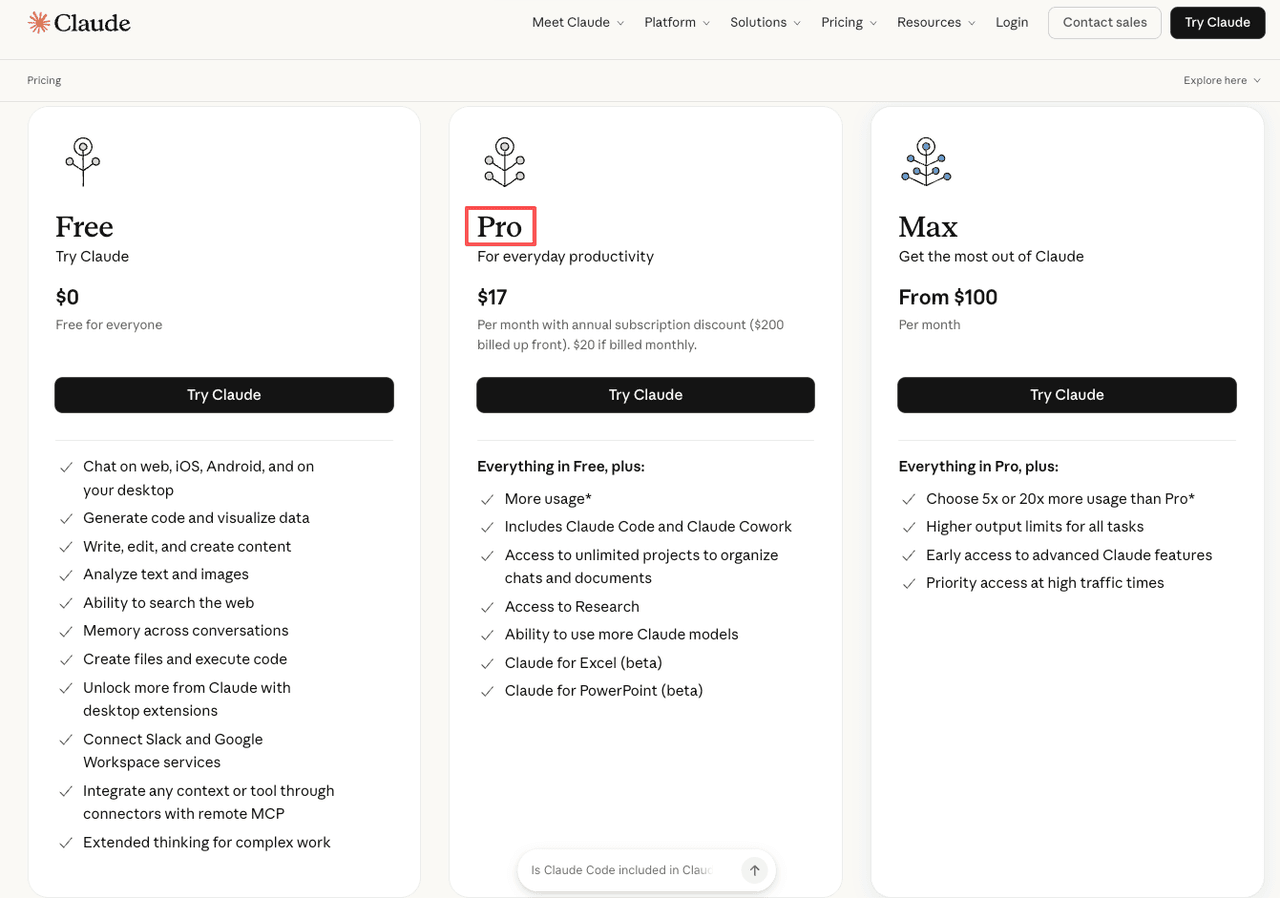
Claude Pro is a flat-rate subscription — $20/month — that gives you access to Claude's most capable models through the chat interface. You pay once, you use it, done. No per-message math, no bills that fluctuate.
Claude API is pay-as-you-go. You're billed per token — roughly per word processed, both in what you send and what Claude sends back. There's no subscription. You add credits, you burn them based on usage, and the bill at the end of the month reflects exactly what you consumed.
Same underlying AI. Very different relationship with your wallet.
How Claude Pro billing works
One fixed price. Currently $20/month (or $18/month if you pay annually). You get Claude Sonnet 4.5, access to Projects, extended thinking on Opus, file uploads, image input — the full consumer feature set. It's designed for individuals using Claude through claude.ai for work, writing, research, thinking.
What it doesn't give you: unlimited usage. Claude Pro has usage limits that kick in during peak hours. When you hit the ceiling, you either wait for the limit to reset or you're offered a downgrade to a lighter model mid-session. This is a known friction point. Heavy users bump into it more than they'd like.
How Claude API billing works
You're billed per million tokens. Pricing varies by model — Haiku is cheapest, Sonnet sits in the middle, Opus costs more. At the time of writing: Claude Sonnet 4.5 runs at $3 per million input tokens and $15 per million output tokens. (Always verify current pricing at Claude API pricing and model tiers — these numbers move.)
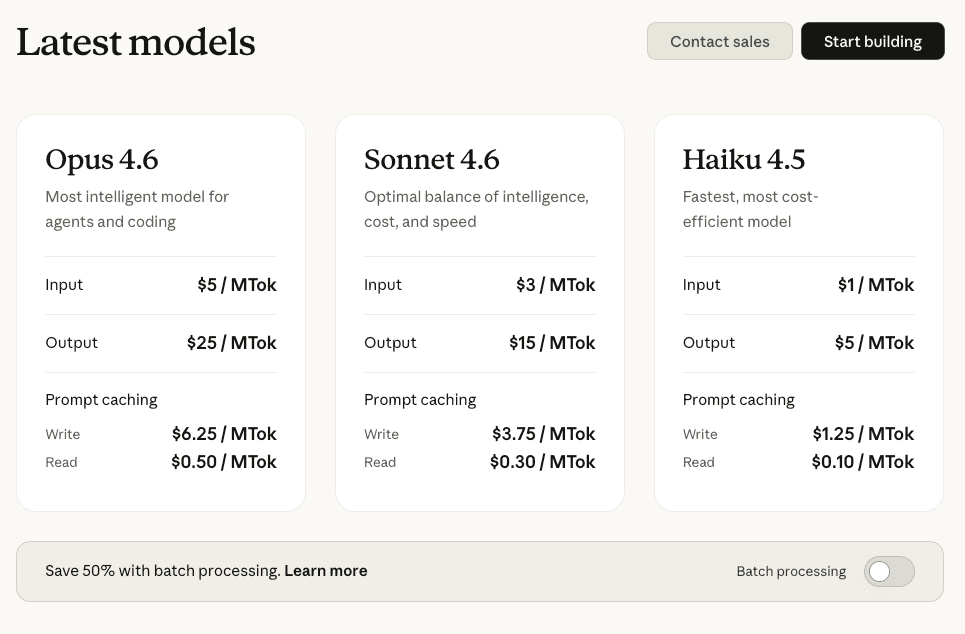
There's no throttling ceiling in the same consumer sense. You can run large volumes, automate workflows, build applications on top of it, and the system scales with what you actually need. The constraint is your credit balance and your rate limits based on your usage tier.
Why Anthropic throttles Pro but not API
This isn't a bug. It's by design. Pro is a flat-fee product — Anthropic has to manage capacity across all Pro users sharing the same pool. The API is usage-based, so you're paying for exactly what you take. That changes the economics completely. API users don't compete with each other for a shared quota in the same way.
Claude Pro: Strengths and Limits
Best for: casual to moderate daily users
If you're using Claude for a few hours a day — drafting, summarizing documents, working through problems, asking it to review something — Pro works cleanly. You open a browser tab, you start typing, and you don't think about infrastructure. That frictionlessness has real value.
Projects let you maintain persistent context across sessions. The interface handles file uploads, image inputs, and long documents without any setup. For most knowledge workers, this covers everything they actually need.
The peak-hour throttling problem
Here's something I want to be direct about: if you push Pro hard — long sessions, big documents, intensive back-and-forth — you will run into limits. Especially during peak hours.
In March 2026, Anthropic confirmed it had adjusted five-hour session limits during peak weekday hours — a change that affected roughly 7% of subscribers, particularly Pro tier users. It's not a dealbreaker, but it's worth knowing before you build your workflow around assuming Pro is unlimited. It isn't.
What heavy users actually run into
The honest picture: you start a complex task, get a few thousand words in, and Claude tells you you've used your allocation and need to wait, or switch to a lighter model. For occasional use, this is a non-issue. For someone who sits down for a three-hour deep work session with Claude as a core tool — it can interrupt the flow at the worst moment.
Claude API: Strengths and Limits
Best for: developers, high-volume, and automated workflows
The API is built for people who want to build things, automate things, or process things at scale. If you're:
- Running Claude through a tool or app rather than the chat interface
- Automating document processing, classification, or summarization
- Building anything that calls Claude programmatically
- Processing enough volume that the per-token math works in your favor
...then the API is where you belong. The ceiling is effectively your credit balance and your account tier, not a shared usage pool.
Industry analysts noted that API customers remain largely insulated from subscription-tier throttling — a distinction worth understanding if you're building anything that needs predictable throughput.
Real cost at different usage levels
This is where you need to do actual math, not guess. Let me sketch it out roughly:
At moderate usage — say, 500,000 input tokens and 200,000 output tokens per month on Sonnet 4.5 — you're looking at approximately $1.50 input + $3.00 output = $4.50/month. That's cheaper than Pro.
At heavier usage — 2 million input tokens, 800,000 output — you're at roughly $6 + $12 = $18/month. Still near Pro pricing but with no throttle.
At very high volume — 10 million input tokens — the cost climbs fast. The API rewards medium users and punishes inefficient high-volume use if you're not paying attention to model selection.
Note: run your own numbers at anthropic.com/pricing with your actual usage patterns before switching.
Setup friction and learning curve
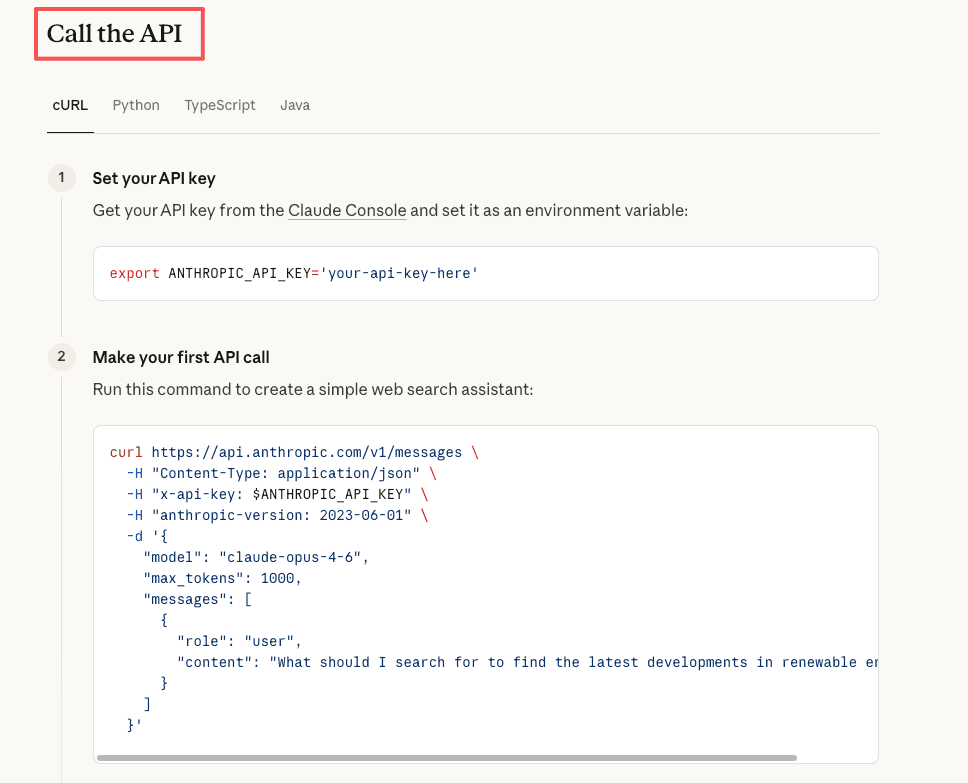
This is the part that trips people up. The API isn't plug-and-play if you're not technical. You need an Anthropic account, an API key, and something to actually send requests — whether that's a simple script, a third-party tool like Cursor or Raycast, or a custom integration. If none of those words sounded familiar, API is probably not your next step. Anthropic's official quickstart walks through your first API call in minutes — the get-started guide is worth bookmarking before you touch anything else.
For non-developers who want API access without the plumbing, there are tools that put a friendlier interface over the API. Worth knowing that middle ground exists.
Decision Framework: Which One to Choose
Choose Pro if...
- You use Claude daily through the chat interface
- Your sessions are moderate in length (not marathon sessions)
- You're not a developer and don't want to manage API keys or billing credits
- You value the clean UX: Projects, file uploads, voice, everything in one place
- You'd rather pay a flat $20 than think about per-token costs
Choose API if...
- You're a developer building something with Claude as a component
- You need to automate or batch-process large volumes of content
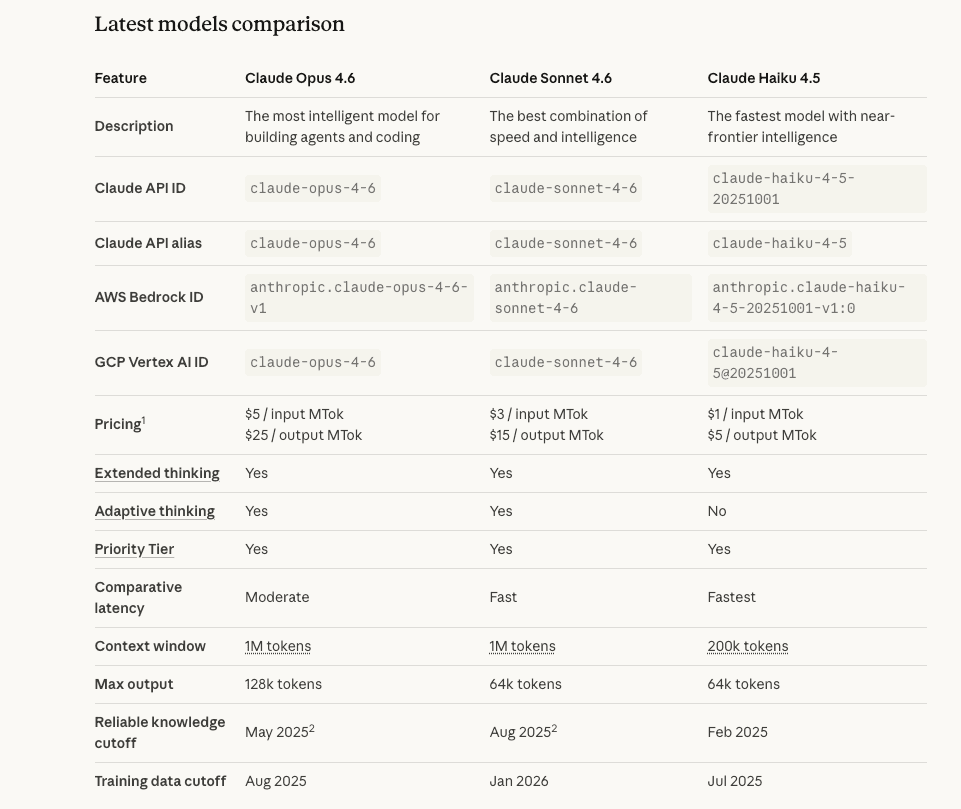
- You want to use Claude inside tools that support API integration (Cursor, custom scripts, etc.). If you're not sure which model to start with, Anthropic's model overview lays out Haiku / Sonnet / Opus by capability and cost in one place.
- Your actual usage, when calculated in tokens, is cheaper than $20/month at your volume
- You need more control: model selection per call, system prompts, structured outputs
Hybrid approach: use both for different tasks
This is what I'd actually recommend for certain people. Use Pro for your daily interactive work — the conversations, the drafts, the thinking-out-loud sessions. Use the API (or API-backed tools) for anything automated, batch, or pipeline-oriented. You're not choosing a religion. You're choosing the right tool for each context.
Switching Costs and What Changes
Moving from Pro to API: what actually changes
The core model is the same. The experience is not. You lose the polished chat interface, the Projects feature as you know it (you'd have to manage context yourself), and the simplicity of just... opening a tab.
What you gain: no throttle ceiling, usage-based billing, programmatic control.
If you've built your whole working rhythm around claude.ai's interface — the Projects, the conversation history, the artifacts — switching to raw API means rebuilding that rhythm. Factor that in before deciding cost savings alone are worth it.
Tools that simplify API access for non-developers
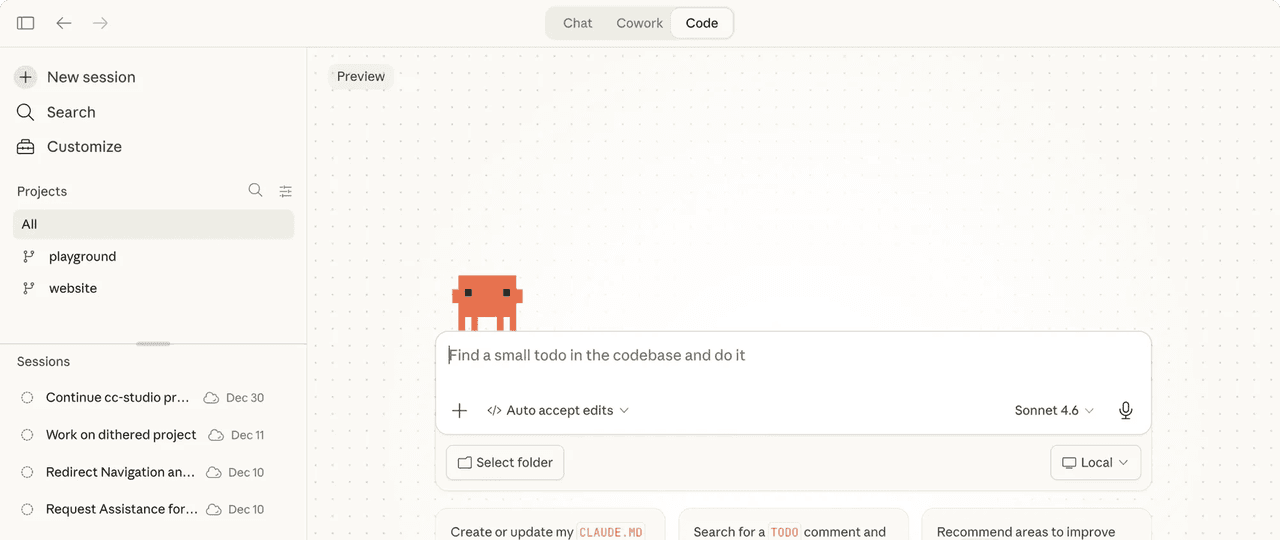
If you want API economics without learning to code: tools like Claude Code, Raycast's Claude integration, or apps built on the Anthropic API give you API-backed Claude without writing a line of code. These options are worth exploring before concluding that API isn't for you.
The Bottom Line
If you're a professional using Claude as a thinking and writing tool through the chat interface — and you're not bumping into Pro's usage limits — stay on Pro. The UX is genuinely good and $20/month is not a meaningful cost for most professionals.
If you're a developer, running automated workflows, or you've done the math and your token volume is actually cheaper via API — switch to API, or at least test it. Set up a small credit balance, run a month of actual usage, and compare.
If you're hitting Pro's throttle limits regularly during peak hours — that's the sign. Either your use case has outgrown Pro's model, or you should look seriously at whether API access (possibly through a cleaner third-party interface) gives you the capacity you need without the ceiling.
Here's exactly what I'd do if I were you: pull up your last week of Claude usage, estimate how many long-form sessions you ran, whether you hit any limits, and whether you're using it interactively or you're pasting outputs into other tools. The answer to those three questions will make the choice obvious.
Pricing data sourced from anthropic.com/pricing. Verify current rates before making decisions.
Recommended Reads