We’ve all been there: you’re staring at your credit card statement, and there it is—another $20 charge for a tool you swore you got rid of. You hit "Delete ChatGPT" on your home screen weeks ago, watched the icon jiggle and disappear, and assumed that was the end of it. But if there’s one thing I’ve learned testing and managing AI tools at 19pine.ai, it’s that getting rid of an app is rarely as simple as dragging it to the trash. Between my daily video calls and endless project boards, I don't have time for surprise subscriptions, and neither do you. If you are trying to delete ChatGPT—whether you want it off your phone, need the billing to stop, or want your account wiped—you need to know exactly which lever to pull. Let's break down the confusing "uninstall vs delete account" trap so you can actually be done with it.
Three things you might mean by "delete ChatGPT"
Most people type "delete ChatGPT" when they're stressed, busy, or staring at a charge they didn't mean to keep paying. But that phrase can mean three totally different actions.
Uninstall app, billing continues, account stays

If you remove the ChatGPT app from your phone (delete the icon, uninstall it, whatever your device calls it), you're only removing the app.
- Your account still exists.
- Your subscription can still be active.
- If you were paying for ChatGPT Plus through Apple/Google, you can still be billed even after uninstalling.
This is the heart of the whole "uninstall ChatGPT vs delete account" confusion. Uninstalling is a device-level action. It's basically saying: I don't want this on my home screen. It's not saying: stop charging me.
Cancel subscription, account stays, billing stops
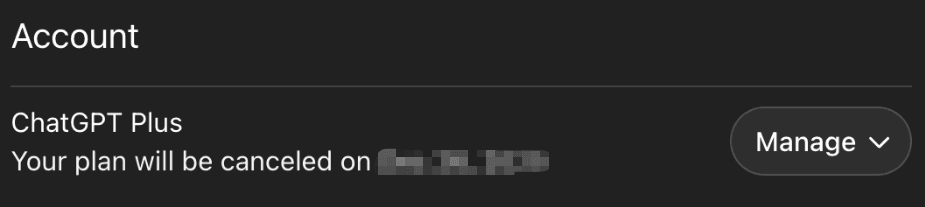
Canceling is the "stop the money" move.
If you're on a paid plan (like Plus or a team plan), canceling the subscription stops future billing (usually at the end of the current billing period).
- Your ChatGPT account stays.
- You can typically still log in.
- You may still have access until your paid time runs out.
If what you mean by "delete ChatGPT" is "I don't want another charge," this is the step you're looking for. It's also the step people skip because they assume app uninstall = cancellation. (It doesn't.)
Delete account, permanent, 30-day window

Deleting your account is the "I'm done" option. This is also where people start thinking about delete ChatGPT data.
In practice, account deletion is:
- Permanent (you're closing the account, not just logging out)
- Usually followed by a deletion timeline, often described as a 30-day window for the deletion process to complete
A key detail: deleting your account isn't the same as canceling billing if your subscription is managed through an app store. You may need to cancel first, then delete.
If you're trying to stop ChatGPT completely, this is the end of the road, but don't skip the billing step on the way there.
Which do you actually need?
This is the part I wish more apps made clearer: you don't want "delete." You want a specific outcome.
Just want it off your phone → uninstall
If ChatGPT is just taking up space, distracting you, or you're trying to clean up your phone before travel, uninstalling is fine.
Uninstalling works when:
- You're not paying for it, or
- You're paying but already canceled elsewhere, and you're just decluttering
This is the "remove ChatGPT app" scenario. Quick, clean, reversible.
Want to stop paying → cancel subscription
If your real goal is "make the charges stop," go straight to cancellation.
I'm being blunt because I've watched smart, busy people (me included) lose money here: ChatGPT app uninstall billing is a real trap. Removing the app doesn't touch your subscription.
Cancel when:
- You're paying for Plus and don't use it enough to justify it
- You signed up for a trial and don't want it converting to paid
- You're taking a break and don't want a recurring charge
Done entirely → cancel then delete
If you want to walk away fully, no billing, no account, no lingering "maybe I'll log in later", do it in this order:
- Cancel subscription (so billing stops)
- Delete account (so the account and associated data are set for deletion)
I know it sounds fussy. But this is the cleanest way to avoid being the person who "deleted" something and still gets billed, or can't log in later and has to untangle it when you're already late for a call.
The number one mistake
Uninstalling app thinking it cancels billing
This is the mistake. The big one.
Uninstalling feels final. The icon disappears, your phone looks tidier, and your brain checks the task off like it's done.
Then a charge hits your card and you're left thinking:
- "Wait, how am I still paying for this?"
- "Did I miss an email?"
- "Do I really have to reinstall it just to cancel?"
And if you're like most professionals I know, the worst part isn't even the money, it's the process. The admin work. The logging into the right place. The "which email did I use?" spiral.
So, here's the rule I use now:
- Uninstall = removes the app from your device
- Cancel = stops future billing
- Delete = closes the account and starts the deletion clock
Different levers. Different outcomes.
This is the bit most people miss: billing lives where you subscribed. If you subscribed through Apple or Google, that's where you cancel. If you subscribed on the web, that's where you cancel. Uninstalling doesn't reach into any of those systems.
Navigating confusing cancellation policies shouldn't add to your daily stress. We designed Pine AI to handle these bureaucratic hurdles with a success-based model, meaning you only pay when the task is successfully completed. See how easy it is to let us handle the disconnect.
Next steps by choice
If you're trying to get this done between meetings (same), pick your path and don't overthink it.
Cancel guide
Use this when your goal is: stop paying.
Figure out where you subscribed.
- If you subscribed in the iOS app, you likely need to cancel in your Apple ID subscriptions.

- If you subscribed in the Android app, you likely need to cancel in Google Play subscriptions.
- If you subscribed on the web, cancel through your account/billing settings on the service.
Cancel, and screenshot the confirmation.
I don't guess. I verify. A quick screenshot saves you from having to "prove it" later.
Check your next billing date.
Many subscriptions run until the end of the current period. That's normal. What you're watching for is: no renewal after that date.
Uninstall if you want it off your phone.
This is optional, but it's nice psychological closure.
Delete guide
Use this when your goal is: stop ChatGPT completely (account + data directionally removed).
Cancel first (if you're paying).
Especially if you subscribed via an app store. Account deletion isn't a reliable substitute for cancellation.
Request account deletion inside your account settings.
Expect it to be explicit, something like "Delete account." Once you confirm, you're usually starting that 30-day window where the deletion process completes.
Plan for permanence.
Deleting means you're giving up access tied to that account. If you used ChatGPT for work drafts, prompts, or saved history, decide whether you need to export anything first.

Give it a beat, then confirm billing is truly off.
Your north star is simple: no future charges. I check my statement once after the next renewal date passes and then move on with my life.
If you came here searching "delete ChatGPT," the real win is leaving with the outcome you intended, app gone, charges gone, account gone, without turning it into a mini project. I've laid out everything you need. The rest is up to you.