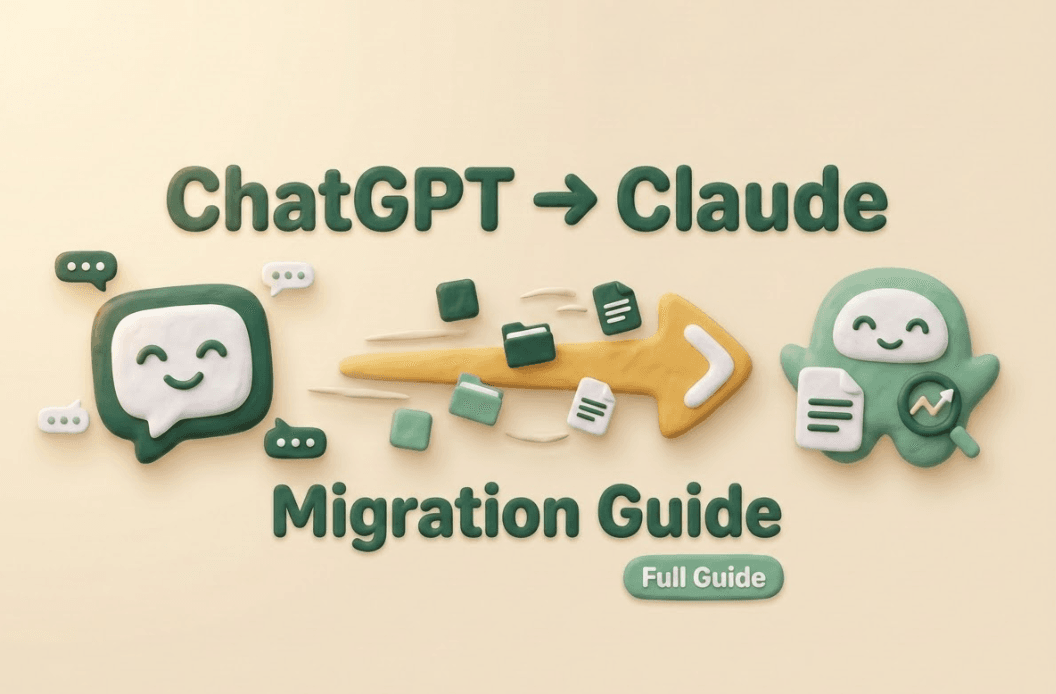
When people ask me how to migrate from ChatGPT to Claude, they usually assume it’s a simple data export—but the reality of switching ecosystems is fundamentally different. I'm Millie, an AI tool strategist for 19pine.ai, and I've spent weeks stress-testing both models. ChatGPT gives you a packaged ecosystem with a sprawling GPT store, while Claude offers a highly focused, long-context workspace through Projects. Trying to force Claude to act exactly like ChatGPT is a recipe for frustration. Instead of a direct 1:1 copy, a successful migration requires adaptation. I’ll walk you through how I personally translated rigid system prompts into flexible Project instructions, and why treating this move as an intelligent archive rebuild will ultimately give you back hours of your week. Ready to see the difference?
What transfers vs what doesn't
When people ask me "how to migrate from ChatGPT to Claude," what they usually mean is: Will Claude feel like home on day one? The answer depends on which parts of your ChatGPT setup you rely on.
Conversations, export from ChatGPT, no import to Claude
You can export ChatGPT history. You can't directly import those conversations into Claude as a threaded chat history the way you probably want.
What you can do instead (and what I actually do):
- Export ChatGPT, search your past chats for the "gold" prompts and answers you reuse.
- Copy/paste the best pieces into Claude as:
- Project instructions
- A "Reference" doc inside a project
- Or a short starter message like: "Here's the context and the output format I need."
It's not as satisfying as a perfect migration. But it's the difference between "I lost everything" and "I moved the parts that save me time."
Custom GPTs → Claude Projects
If you've built Custom GPTs that act like mini assistants ("my meeting-notes GPT," "my client email drafter," etc.), the closest equivalent in Claude is Projects.
The mental shift:
- ChatGPT Custom GPT = a packaged assistant with baked-in instructions/tools.
- Claude Project = a workspace where you set instructions + store relevant docs + keep related chats together.
In practice, Projects are where you rebuild the repeatable stuff.
Memory → Claude memory feature
ChatGPT's memory is useful when it sticks, confusing when it doesn't, and occasionally… a little too confident. Claude's memory feature is different in a few key ways (and this is the bit most people miss):
- Claude remembers across sessions (web/desktop/mobile) when memory is enabled.
- It's geared toward work context and can be edited.
- Claude can also import memory (depending on the tooling available in your account), and it tends to be more selective, non-work personal details may be filtered.
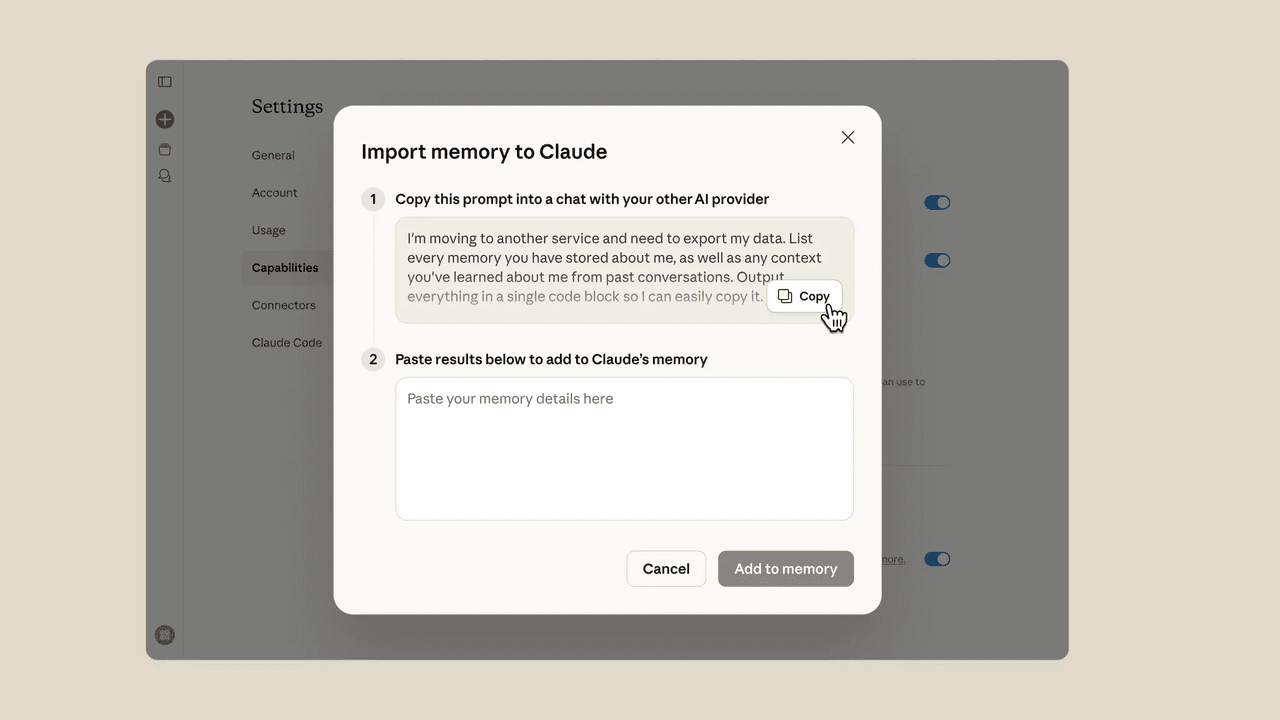
So if your big worry is "will I have to re-explain my preferences every week," Claude's memory can cover a lot of that, just not by importing your ChatGPT life wholesale.
Export your ChatGPT data first
Before you do anything in Claude, export your ChatGPT data. Even if you don't think you need it. Future-you will, especially if you eventually decide to delete your ChatGPT account. I don't guess. I verify.
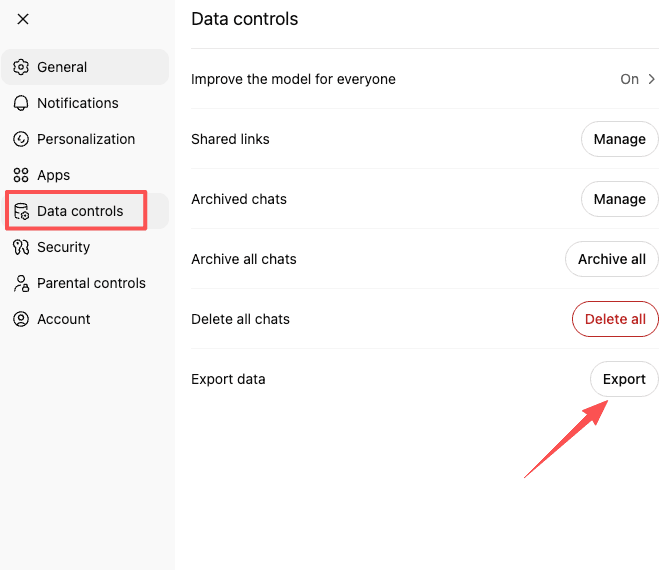
Settings → Data Controls → Export
In ChatGPT, you'll typically find export here:
- Settings
- Data Controls
- Export data (or "Export") and follow the prompts
ChatGPT will email you a download link when it's ready. Don't expect instant gratification, sometimes it's quick, sometimes you're waiting long enough to forget why you started.
What's in the export file
Your export usually includes:
- Conversation history (often as JSON and/or HTML)
- Account-level data tied to your usage
- Metadata about chats
What it's not: a neat folder of "Top 10 prompts Millie uses when she's sleep-deprived and trying to write a brief." You'll have to extract value from it.
My practical approach:
- Open the export and search for recurring topics (client names, project code names, "outline," "email version," "contract clause," etc.).
- Pull out your best reusable prompt patterns.
- Paste them into a living doc called something like "ChatGPT → Claude prompts" so you're not re-mining the export every time.
If your goal is to move workflows to Claude, this export isn't the migration tool, it's the archive you use to rebuild intelligently.
Feature mapping: ChatGPT → Claude
Here's the cleanest way I've found to map features without getting lost in product philosophy debates.
Custom GPTs → Projects
If you're used to opening a specific GPT for a specific job, recreate that as a Claude Project.
How I translate one Custom GPT into a Claude Project:
- Create a Project named after the job-to-be-done (not the tool), e.g. "Client Proposals" or "Code Review."
- Add:
- Project instructions (the "rules")
- A couple of example outputs (your gold-standard)
- Reference docs (style guide, API docs, brand voice notes)
This gets you surprisingly close to the "pick a GPT from the sidebar" feeling, without depending on an ecosystem of prebuilt assistants.
System prompts → Project instructions
If you've collected system prompts (or you've tweaked Custom GPT instructions over time), those become Project instructions in Claude.
A tip that saved me time: don't paste your entire mega-prompt as-is. Translate it.
- Put stable rules in Project instructions (tone, formatting, do/don't lists).
- Put variable context in the chat message (this client, this task, this deadline).
If you're searching for chatgpt to claude prompts, this is the heart of it: prompts don't "port," they adapt. Claude tends to respond better to clear goals + examples than to overly legalistic constraints.
DALL-E → no direct equivalent
If DALL‑E inside ChatGPT is part of your daily flow, set expectations early: Claude doesn't have a direct, built-in equivalent in the same way.
That doesn't mean you can't do visual work: it means your workflow becomes multi-tool:
- Use Claude for ideation, image prompts, art direction, variations, and selection criteria.
- Use a dedicated image generator elsewhere for the actual images.
Annoying? A bit. But if most of your time savings come from writing, reasoning, and long-context work, you may not care day-to-day.
Recreate your key workflows
When I migrate tools, I don't start with features. I start with the three things I do every week no matter what: writing, coding (lightly, but often), and research. If you try to rebuild everything at once, you'll abandon the migration halfway through and keep paying for both (unless you remember to cancel your ChatGPT subscription). Ask me how I know.
Writing workflows
My writing workflow is basically: rough notes → structured outline → first draft → tighten → client-ready.
In Claude, I recreate that with:
- A "Writing" Project with instructions like:
- my preferred structure
- what to avoid (filler, corporate jargon)
- how to handle sources and uncertainty
- A few reference examples: intros I like, endings I like, and one "before/after" edit
What surprised me: Claude's writing often needs less coaxing to sound natural. It will still drift if you let it, but the baseline is strong, especially for editing and rewrites.
The only friction: setup took longer than I wanted. Not deal-breaker long, just the usual "I thought this would be five minutes and it's fifteen" situation.
Coding workflows
I'm not a full-time developer, but I do enough coding-related tasks (scripts, debugging, reviewing snippets, explaining errors) that it matters.
To move that workflow:
- Create a "Dev Help" Project.
- Paste in:
- your stack basics (language versions, frameworks)
- your preferences (tests, comments, terse vs verbose)
- any recurring constraints (security, performance, style)
Claude is especially good when you give it:
- the exact error
- the minimal reproducible snippet
- what you already tried
And because Claude supports very large context, it's better suited for "here's a long file / long log, find the issue" style work. That's the kind of task I usually postpone because it's mentally expensive.
Research workflows
This is where professionals bleed time: you don't want an essay, you want an answer you can trust.
My Claude research setup:
- A "Research" Project with instructions like:
- provide a quick answer first
- list assumptions
- separate confirmed facts vs interpretations
- give me a checklist of what to verify
Then I use it the same way I use project management: as a place to keep the thread clean. One topic per chat. Notes go into a running doc.
If your main reason to switch from ChatGPT to Claude is to stop re-explaining context, Projects + memory help your research stay coherent across days, especially if you're juggling travel, deadlines, and the kind of inbox that never hits zero.
What Claude does better
I'll be honest, I went in expecting very little. "Better" claims are cheap.
But Claude does outperform in a few areas that matter to someone who's trying to get work done and get on with their life.
Specific strengths
Here's what stood out in real use:
- Natural writing and editing: Claude is consistently strong at making text sound like a human wrote it, without sanding off all personality. For me, that means fewer rounds of "make this less stiff" and more time actually shipping the draft.
- Large-context reasoning: Claude's ability to handle very long context (up to extremely large token windows in supported versions) changes what you can dump into a single session, long transcripts, long briefs, long documentation, and still get coherent output.
- Cleaner coding help: When I paste messy code and ask for a fix, Claude's responses are often more structured and easier to apply. Not magic. Just… less chaos.
- Privacy/safety posture: Claude's safety framing (often described as "Constitutional AI") tends to feel more considered. For professionals handling client work, that tone matters.
None of this means Claude is "the best" universally. It means it's better at the things that cost me time when they go wrong: rewriting, reasoning over lots of material, and not getting lost halfway through the task.
What you'll miss from ChatGPT
Switching tools always has a mourning period. Usually small. Occasionally annoying.
Image generation, GPT Store ecosystem
Two things are hard to replace if you rely on them:
- Image generation: If you're used to generating images in the same place you write and iterate, ChatGPT's integrated experience is convenient. In Claude, you'll likely split the workflow across tools.
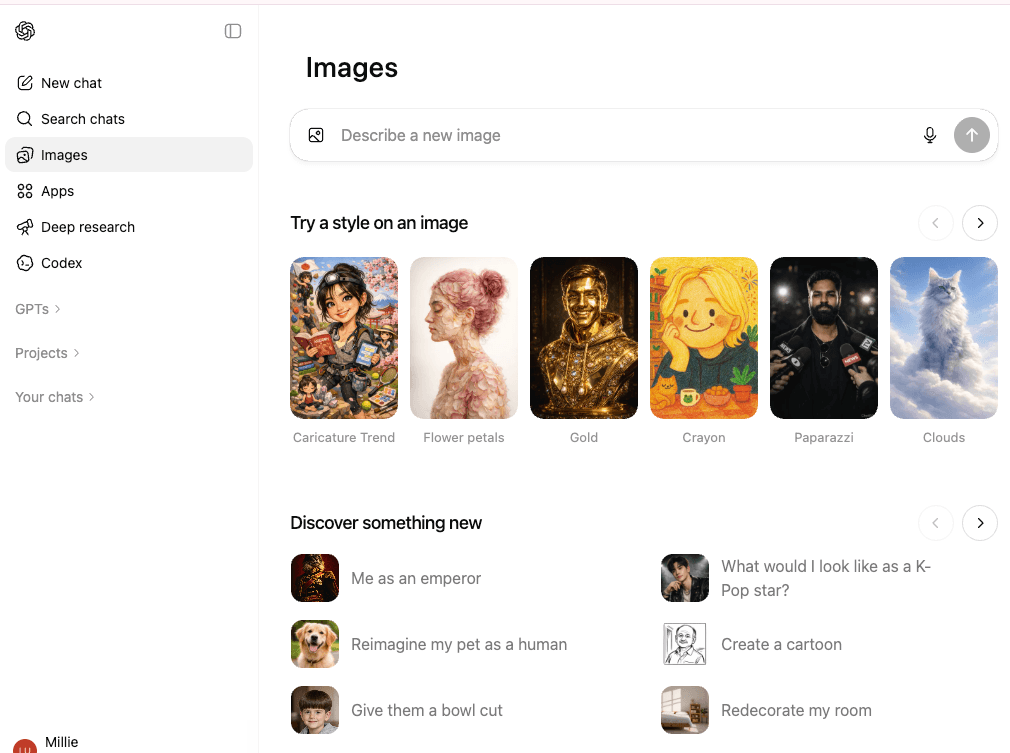
- GPT Store / ecosystem feel: ChatGPT's ecosystem of Custom GPTs can be a shortcut, especially if you like browsing purpose-built assistants. Claude Projects are more of a "build your own structure" approach. That's great when you know what you need. Less great when you want to discover it.
If your day-to-day depends on those, your migration might be partial rather than total. And that's fine. The goal isn't loyalty, it's getting your hours back.
Should you fully switch or use both?
Most professionals I know don't need a dramatic breakup. They need a practical setup that doesn't create more admin.
Decision framework by use case
Here's the framework I use when someone asks whether to fully migrate:
Go mostly-Claude if you care most about:
- long documents, long threads, and keeping context intact
- writing that sounds natural with less fuss
- deep analysis without a lot of fluff
Keep ChatGPT in the mix if you rely on:
- built-in image generation as part of daily deliverables
- a specific Custom GPT you can't replicate quickly
- an ecosystem of prebuilt assistants you don't want to rebuild yourself
A sane middle path (what I'd recommend to a busy colleague):
- Move your core work Projects to Claude first (writing/coding/research).
- Keep ChatGPT for the one or two tasks where it's still the easiest button.
- Reassess after two weeks, based on what you actually opened, not what you meant to open.
If you're trying to move workflows to Claude, the win isn't "everything transferred." The win is that the annoying parts—re-explaining, reformatting, re-finding old context—stop eating your day. If you do eventually decide to completely migrate your workflow, just make sure you cancel your ChatGPT subscription on the website to avoid paying for an unused service.
I've laid out everything you need. The rest is up to you.
We’ve shown you how to migrate your high-value workflows to Claude. Now, let Pine handle the administrative cleanup—like canceling your old ChatGPT subscription or negotiating better rates for your new AI stack—so you can focus on your new workspace.
Frequently Asked Questions
How to migrate from ChatGPT to Claude without losing important context?
Start by exporting your ChatGPT data, then mine it for your “gold” prompts, reusable answers, and formats. Recreate those inside Claude as Project instructions, reference docs, and a short starter message per workflow. You’re not transferring everything—you’re moving what saves time.
Can I import my ChatGPT conversations into Claude as chat history?
Not directly. You can export ChatGPT history, but Claude doesn’t import it as a threaded conversation timeline. The practical workaround is to search your export for high-value prompts and outputs, then paste them into Claude Projects as instructions, references, or reusable templates.
How do Custom GPTs translate when moving from ChatGPT to Claude?
Custom GPTs map most closely to Claude Projects. Instead of a packaged assistant, a Project is a workspace with instructions, stored docs, and related chats. Create Projects named by job-to-be-done (like “Client Proposals”), then add rules, example outputs, and reference materials.
What’s the best way to move ChatGPT system prompts to Claude Projects?
Don’t paste a mega-prompt verbatim—adapt it. Put stable rules (tone, formatting, do/don’t lists) into Claude Project instructions, and keep variable context (client, deadline, task) in the chat message. Claude typically performs better with clear goals plus examples than rigid constraints.
Should I fully switch from ChatGPT to Claude or keep both?
Go mostly-Claude if you need long-context work, natural writing/editing, and coherent multi-day research. Keep ChatGPT if built-in image generation or a specific Custom GPT is central to deliverables. A common approach is migrating core workflows to Claude first, then reassessing after two weeks.