


Newsday
Cancel subscription
How to Cancel Your Newsday Subscription Safely
Practical guide to cancel a Newsday subscription billed through Apple or Google Play. Learn where to tap, what changes after cancellation, and how refunds work.
- 1 cancellation path matched to the billing owner
- Renewal timing and access outcome explained
- Refund requests routed to the company that billed you
- Confirmation steps included for every path
Choose the Newsday cancellation path that matches who bills you
Newsday in Apple Subscriptions · verify the billing owner
How to cancel Newsday through Newsday in Apple Subscriptions
 1
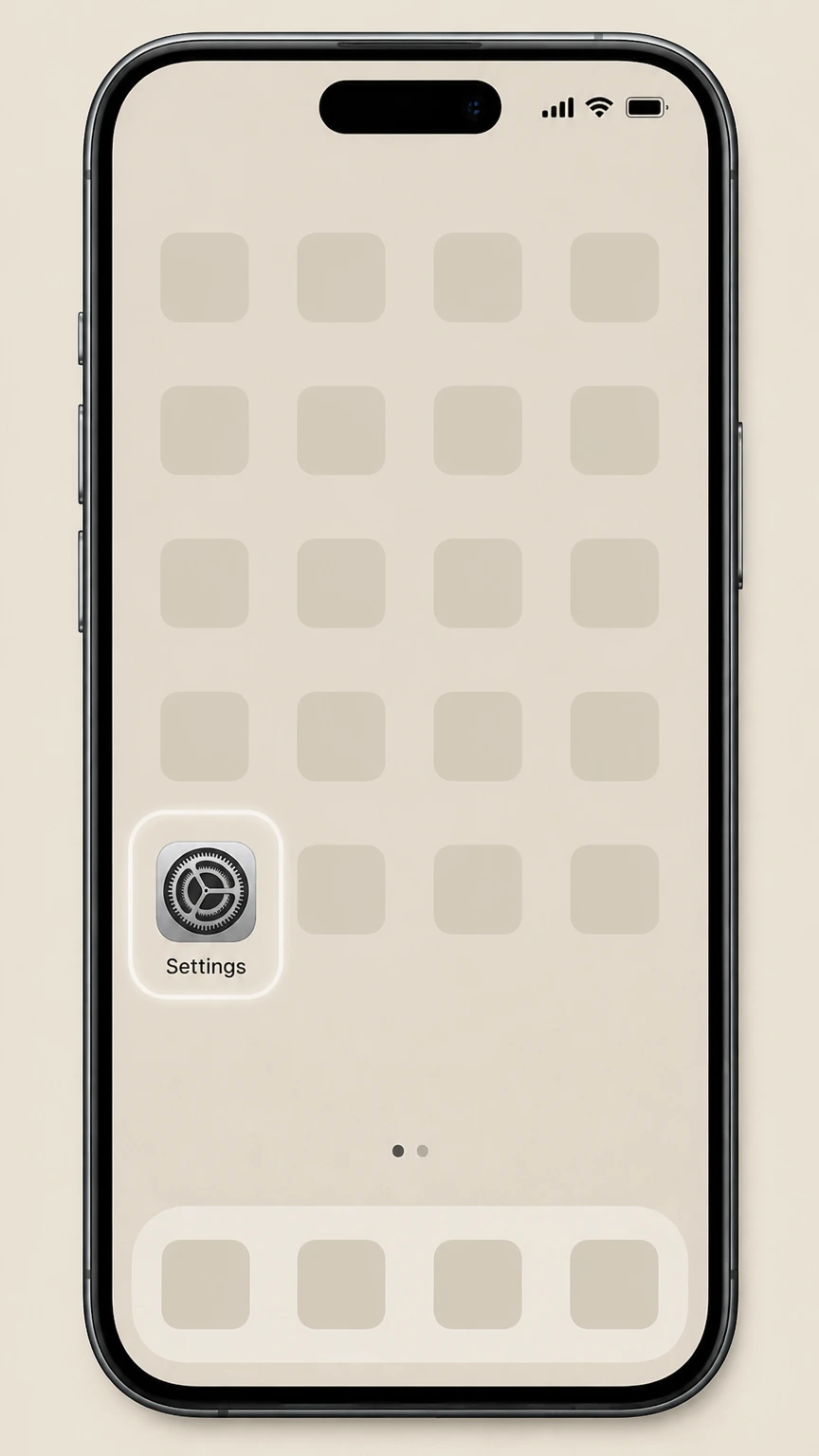
1Open Settings
Open Settings on the iPhone or iPad signed in to the Apple Account that owns the subscription.
 2
2Tap your name
Tap your name at the top of Settings to open the Apple Account controls.
- Let Pine handle it
Pine can help
Too many steps?
Pine can find the right Newsday in Apple Subscriptions path and handle the cancellation for you.
 3
3Open Subscriptions
Choose Subscriptions to display the recurring services billed to this Apple Account.
 4
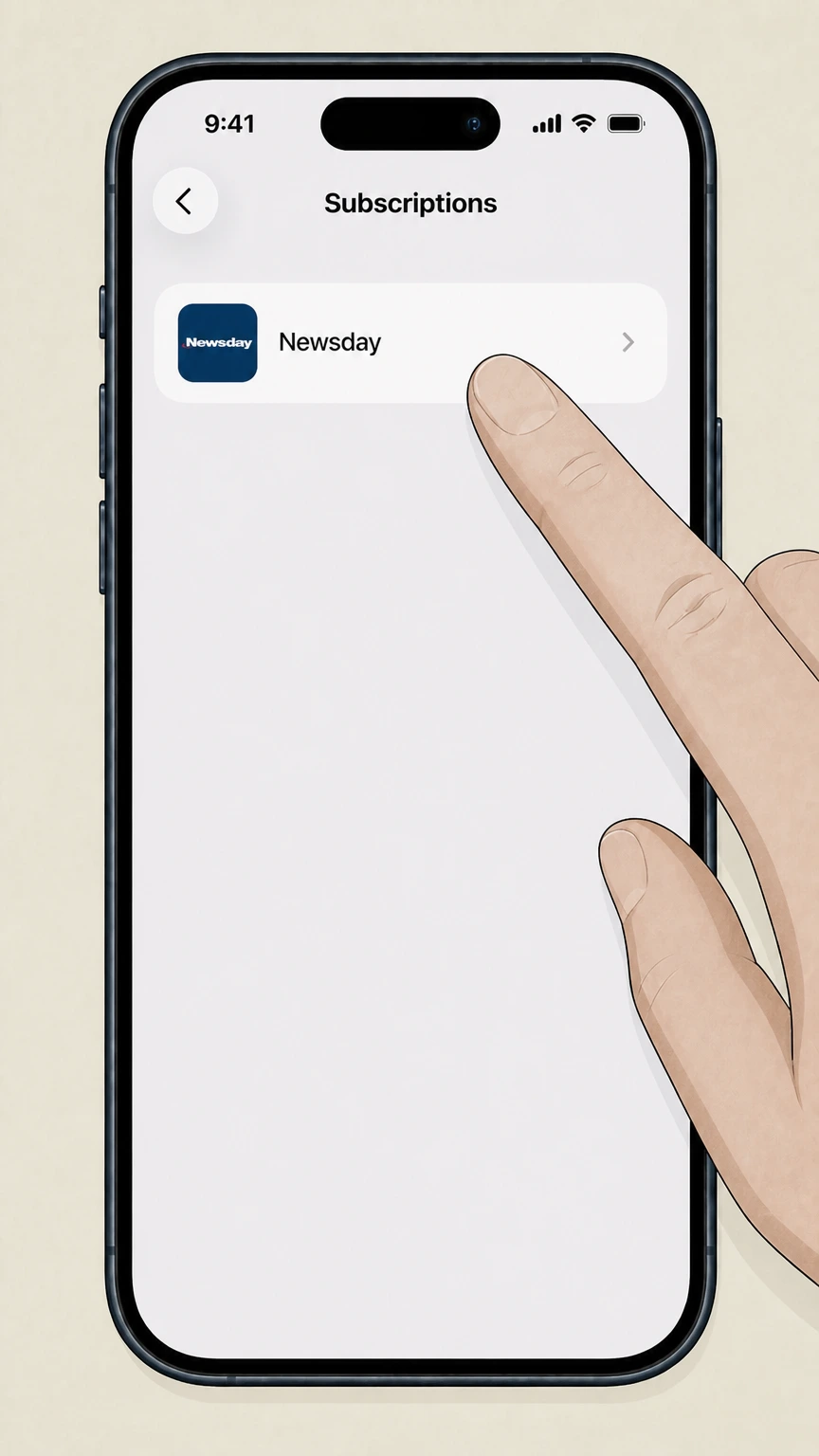
4Select Newsday
Choose Newsday from the subscription list to open its renewal details.
 5
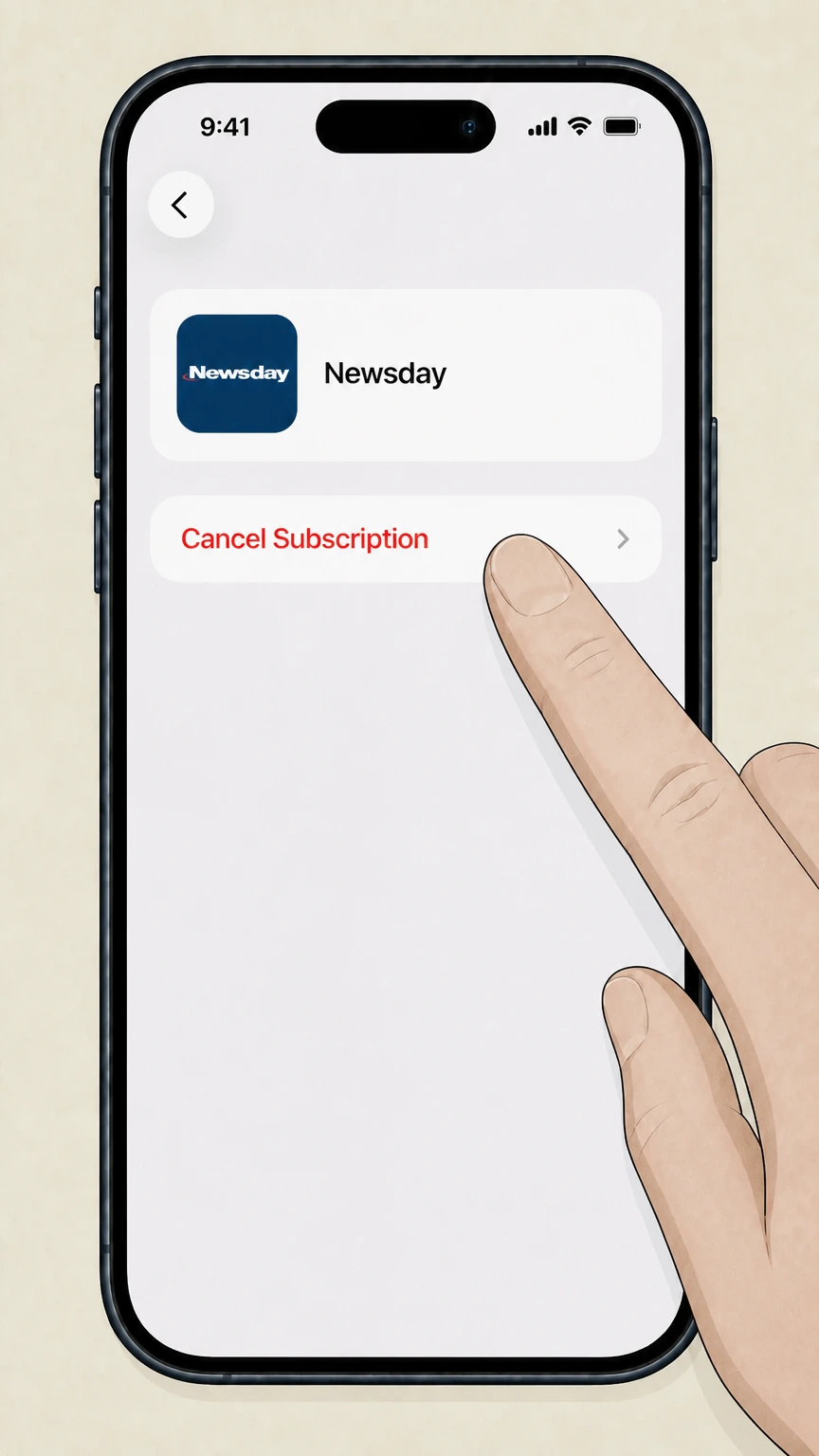
5Cancel the subscription
Tap Cancel Subscription and complete Apple’s prompts for Newsday.

Refund policy
Refunds after canceling a Newsday subscription
Refunds for Newsday depend on who billed you. Apple and Google Play each apply their own refund rules to in-app Newsday subscriptions, and canceling only stops future renewals; it does not automatically return past charges.
Check my refund options- Apple handles refunds for Apple-billed Newsday charges
- If your Newsday subscription was billed through Apple, you must sign in to reportaproblem.apple.com, choose Request a refund, select a reason, and then select the relevant subscription. Apple reviews the request and may or may not approve a refund.
- Cancellation and refund are separate on Apple
- Apple’s documentation notes that if you were charged for a subscription you no longer want, you can cancel it, but the act of canceling stops future renewals only; any money already paid is handled under the separate refund-request process and Apple’s media terms.
- Google Play tightly limits subscription refunds
- Google’s refund policies for subscription and Subscribe with Google purchases state that refunds are generally not provided except in limited scenarios, such as faulty products or benefits that do not match the description, and depend on Google Play’s general refund rules.
- Past periods usually stay paid on Google Play
- Google Play’s subscription help explains that when you cancel, you continue to use the subscription for the time you have already paid; past periods are normally not refunded, though Google Play may grant exceptions according to its refund policies.
If your Newsday charge does not appear under either your Apple ID purchase history or your Google Play subscriptions, contact the billing entity named on your bank or card statement, as this guide cannot verify Newsday’s direct-billed refund rules. Check who actually billed you
Service status
How Newsday sells digital access today
What we can confirm about Newsday’s current digital products from allowed official sources.
Active Newsday iOS app
Apple’s App Store lists an active Newsday app (“Long Island News Coverage”) with recent updates and in-app purchases for Newsday-branded subscriptions, confirming that digital access via iOS is currently offered.
In-app subscription on iOS
The App Store page states that Newsday subscribers have unlimited access to the app and that you can subscribe via iTunes for an all-access digital subscription, indicating that some Newsday digital access is billed by Apple as an in-app purchase.
Newsday subscription on Google Play
Google Play hosts a Newsday app whose “Subscription information” section describes a recurring Newsday subscription that is charged to, and auto-renews through, the customer’s Google Play account until canceled.
Scope limited to platform-billed access
Because this audit may only use domains such as apple.com and google.com, it can safely describe subscriptions billed by Apple or Google Play but cannot independently verify Newsday’s own website, print delivery, or other direct-billed products.
Who bills you
Billing owners for Newsday app subscriptions
Understanding whether Apple, Google, or Newsday itself controls your subscription is essential before you try to cancel.
Apple as billing owner on iOS
The Newsday iOS listing shows that the app is free with in-app purchases and explicitly offers an all-access subscription via iTunes, meaning Apple acts as the billing owner when you start Newsday from within the iOS app.
Google Play as billing owner on Android
The Newsday Google Play page explains that its subscription is billed to your Google Play account and set to auto-renew each month unless you turn off renewal, so Google is the billing owner for that product.
Receipts identify the billing platform
Apple advises searching for a “receipt from Apple” or “invoice from Apple” to confirm that a subscription is billed by Apple; if no such receipt exists and Google Play doesn’t show Newsday, your plan is likely billed directly by Newsday or another partner.
Direct-billed Newsday subscriptions not covered
Any Newsday subscriptions purchased outside the iOS or Google Play apps—such as via Newsday’s own website or print delivery channels—are not described here, because we cannot safely reference Newsday-owned web pages under the current domain restrictions.
Apple route
Canceling a Newsday subscription billed by Apple
How cancellation works when the Newsday subscription appears under your Apple ID in Subscriptions.
Use Apple’s Subscriptions menu
Apple’s support article instructs users to cancel any subscription billed by Apple, including in-app subscriptions, from Settings > [your name] > Subscriptions on iPhone or iPad, rather than from inside the individual app.
Select the Newsday entry
Within the Subscriptions list, you must tap the Newsday entry and then use the Cancel Subscription button; if no cancel button appears or you see an expiration message in red, Apple considers the subscription already canceled or expired.
Covers iOS, iPadOS, and Apple TV access
Apple’s subscription management is account-based; canceling the Newsday subscription for your Apple ID affects Newsday access on all devices signed into that Apple ID that rely on that in-app subscription.
Apple remains the contact for billing issues
For subscriptions billed by Apple, Apple’s support and refund tools—such as reportaproblem.apple.com and the Apple Support channels—are the official place to address mistaken charges or refund requests, not Newsday’s own customer service.
Google route
Canceling a Newsday subscription billed by Google Play
What to expect when stopping a Newsday subscription that renews through your Google Play account.
Cancel from Google Play, not the app
Google’s help center makes clear that uninstalling an app does not cancel its subscription; you must go to Subscriptions in the Google Play app, select the relevant subscription (such as Newsday), and tap Cancel subscription.
Auto-renewal stops, access continues for paid time
Google Play explains that when you cancel, you can continue to use the subscription for the time you have already paid, after which access ends and no further renewals are charged unless you resubscribe.
Email receipts and Subscriptions tab as proof
Google Play notes that subscriptions are tied to a specific Google account and that you can view subscription state and renewal dates in the Subscriptions section; if Newsday no longer appears as active there, its Google Play subscription has been stopped.
Refunds governed by Google Play policies
The cancellation article and related refund-policy pages emphasize that past subscription periods normally are not refunded, with only limited exceptions described in Google Play’s general refund policies and Subscribe with Google terms.
What changes
What happens to Newsday access after you cancel
How your ability to read Newsday content changes once you stop renewal on Apple or Google Play.
No new charges after the current period
Both Apple and Google state that canceling a subscription stops future renewals; you should not be billed again for Newsday after the end of the already-paid period associated with your final successful renewal.
Google Play: access lasts through paid term
Google Play gives an explicit example showing that canceling a yearly subscription mid-year still lets you use it until the end of the paid year, illustrating that access continues until the already-paid period ends.
App remains installed but content may lock
Canceling a subscription on Apple or Google does not remove the Newsday app itself from your device, but premium content inside the app will stop loading once the billing platform considers your subscription expired.
Print and website-only products may differ
Access rules described here apply only to subscriptions managed through Apple or Google Play; Newsday may apply different rules to print delivery or website-only subscriptions that are billed directly and are not documented in the allowed sources.
Refund options
Refunds for Newsday subscriptions via Apple or Google
How refunds are handled when Newsday charges appear on Apple or Google Play statements.
Apple refunds are separate from cancellation
Apple’s refund article explains that some App Store purchases, including subscriptions, may be eligible for a refund, but you must request this separately at reportaproblem.apple.com; canceling a subscription alone does not automatically refund past charges.
Apple evaluates refund requests case by case
Apple asks users to choose a reason and submit a request; approval is not guaranteed and eligibility can vary by country or region according to the Apple Media Services Terms and Conditions.
Google Play rarely refunds past periods
Google’s Subscribe with Google refund policy notes that refunds are generally not given for most purchases unless they are faulty, do not match stated benefits, or you have a specific legal right of withdrawal, and directs users to Google Play refund resources for details.
Subscription refunds constrained by platform policy
Both Apple and Google stress that their own refund rules govern payments they process; if Newsday charged you directly through another channel, you would need to follow that channel’s policies, which are outside the scope of this guide.
Accounts & data
Effect of cancellation on accounts and saved content
What cancellation does—and does not—change for your Apple, Google, and Newsday-related data.
Apple ID and Google account remain active
Canceling a subscription from Apple or Google Play does not close your Apple ID or Google account; those accounts, and other subscriptions billed through them, continue to function normally.
Newsday login is usually separate from billing
The Newsday app description indicates that existing Newsday subscribers can use the app for unlimited access, implying a Newsday account that is distinct from Apple or Google billing and should continue to exist even if you stop an in-app subscription.
App settings and downloads may be limited later
After the billing platform marks your Newsday subscription as expired, previously downloaded editions or saved articles may no longer update or may become inaccessible if they require an active subscription to validate access.
No automatic data deletion is described
Neither Apple’s nor Google’s subscription help pages state that canceling a third-party subscription like Newsday automatically deletes your app data or reading history; any data deletion policies specific to Newsday would be described by Newsday itself, which we cannot review here.
Scope limits
What this Newsday cancellation guide cannot cover
Gaps caused by domain restrictions and missing provider-owned documentation.
No direct view of Newsday.com
Because this audit is limited to domains such as apple.com and google.com, it does not rely on or quote any current information from newsday.com, including cancellation forms, phone numbers, mailing addresses, or email contacts.
Print delivery and vacation holds excluded
We cannot safely describe how to cancel or suspend Newsday print delivery, manage vacation holds, or change print billing terms, because those flows are typically documented only on Newsday’s own site or customer communications.
Website-only digital subscriptions not covered
Any Newsday digital access purchased directly through Newsday’s website, rather than through an app store, may have different cancellation, access, and refund rules that are not documented in the allowed official sources used here.
No confirmation of special discounts
We cannot confirm the existence, terms, or eligibility rules for any Newsday senior discounts, promotional bundles, or regional offers, because such offers would be advertised by Newsday or local partners rather than by Apple or Google Play.
Advice limited to platform-owned processes
All procedural steps and policy explanations are drawn from Apple and Google’s own help materials; users whose Newsday charges do not come from Apple or Google Play should contact Newsday or their actual billing provider using the contact details on their bill or receipt.
Newsday cancellation FAQ
Answers about Newsday billing ownership, cancellation timing, refunds, and access after cancellation.
How do I cancel my Newsday subscription on iPhone?
How do I cancel my Newsday subscription on Android?
What happens to my Newsday access after I cancel on Google Play?
What happens to my Newsday access after I cancel on Apple?
Does canceling my Newsday app subscription delete my Newsday account?
Can I get a refund after canceling my Newsday subscription on Apple?
Can I get a refund for my Newsday subscription on Google Play?
How do I know who is billing me for Newsday?
Does Newsday offer a senior discount for subscriptions?
How do I suspend Newsday delivery or start a vacation hold?
Untangle this Newsday issue.
Let Pine handle the provider follow-up and keep the confirmation in one place.
