


Fubo
Cancel subscription
How to Cancel Fubo Subscription
Cancel Fubo through the company that bills the subscription. Fubo’s official guide separates direct web billing from Roku and other platform billing; use the seller shown in My Account or the receipt. Fubo says a paid direct plan generally remains available through the current cycle, while canceling a direct free trial can end access immediately; the billing platform controls partner purchases. Compare every supported billing route, cancellation effect, refund boundary, and proof to keep.
- 2 official sources checked
- 4 billing routes separated
- Cancellation and refund outcomes kept distinct
Cancel Fubo through the company that bills you
Web · Verify this billing owner
Cancel Fubo on the web
 1
1Open Fubo My Account
Sign in on fubo.tv and open Subscription & Billing.
 2
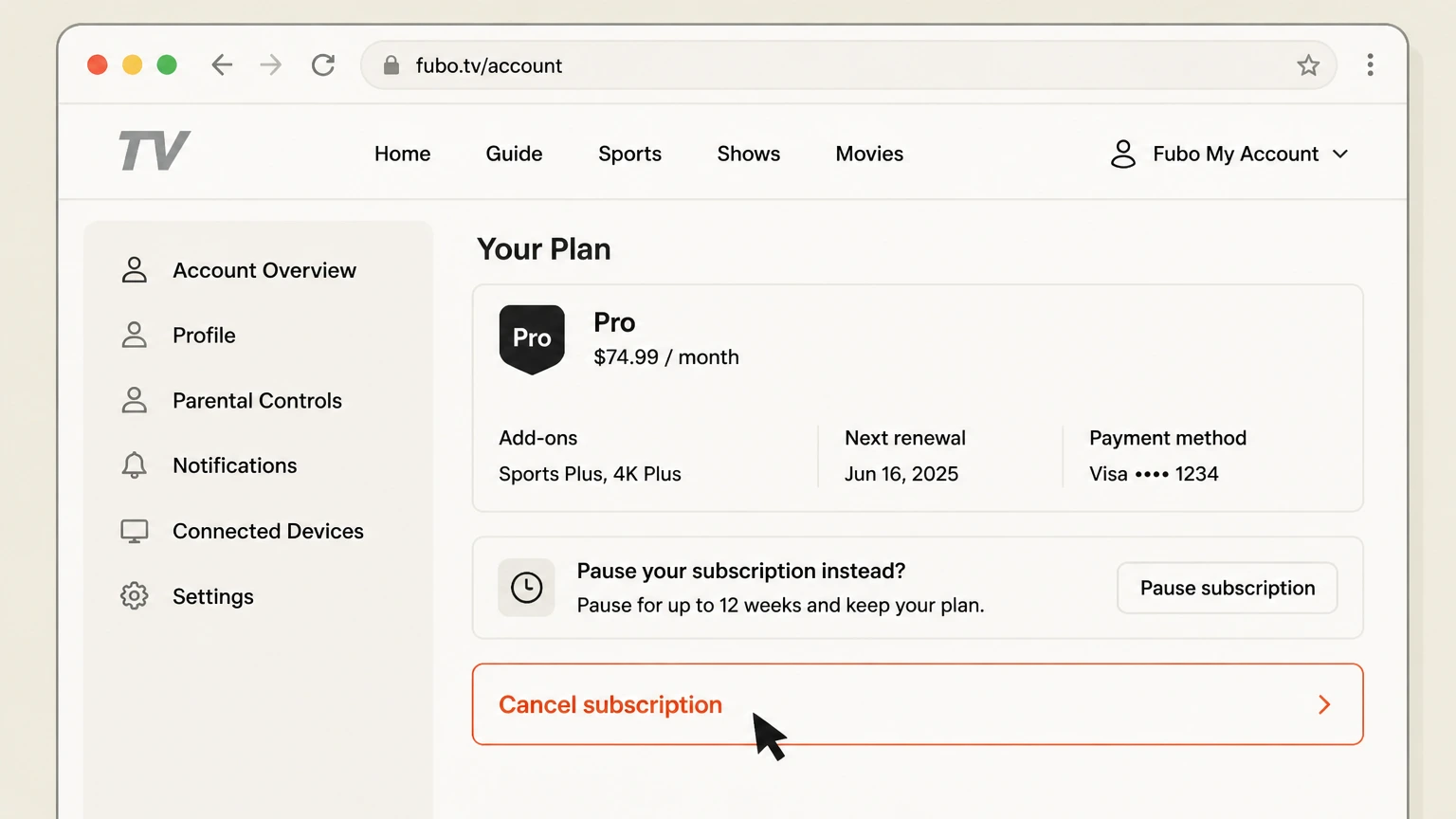
2Choose Cancel subscription
Review the plan, add-ons, next renewal, and any pause offer.
- Let Pine handle it
Pine can help
Too many steps?
Pine can find the right Web path and handle the cancellation for you.
 3
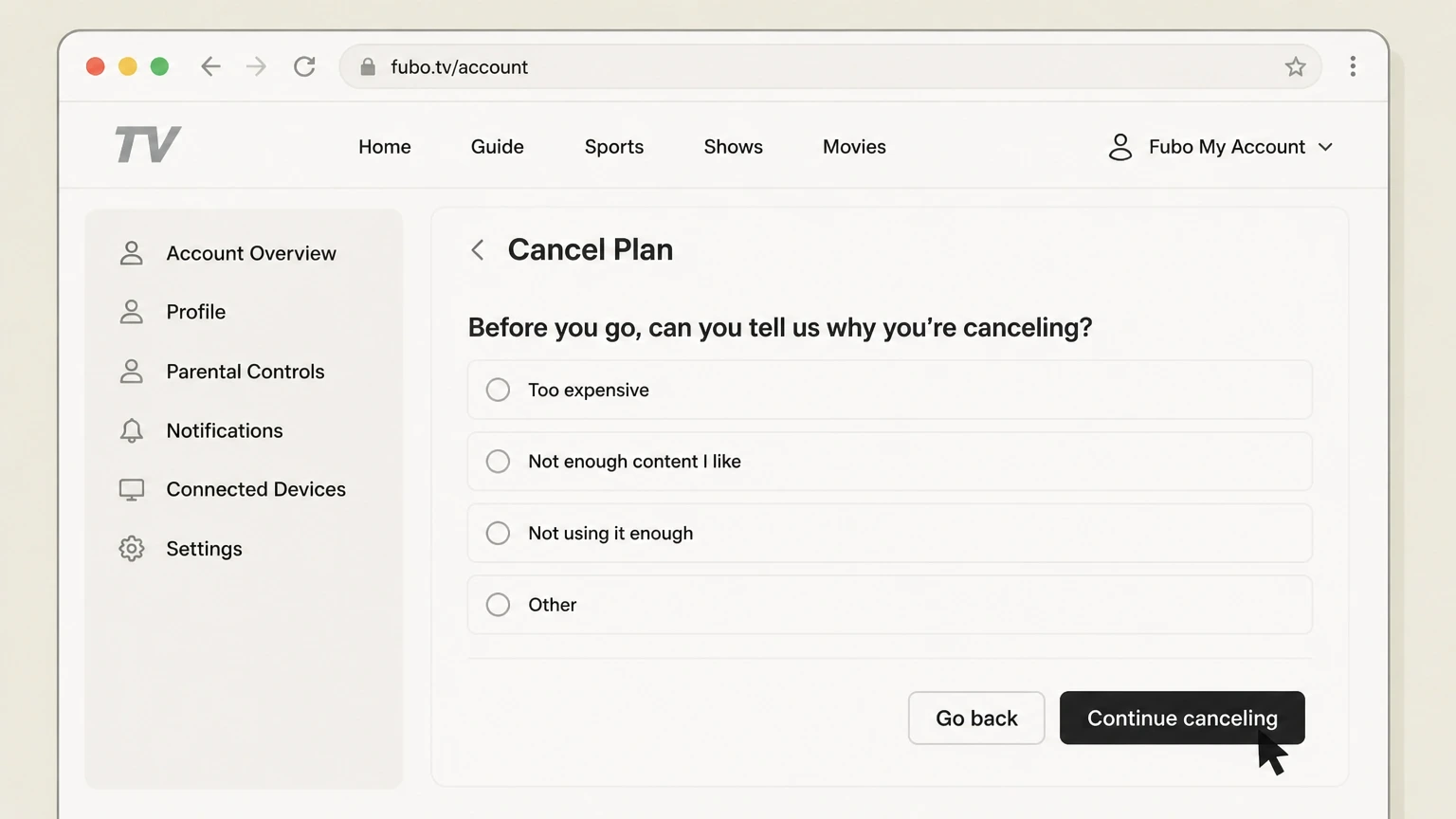
3Continue canceling
Proceed through reason and offer screens until the cancellation is confirmed.
 4
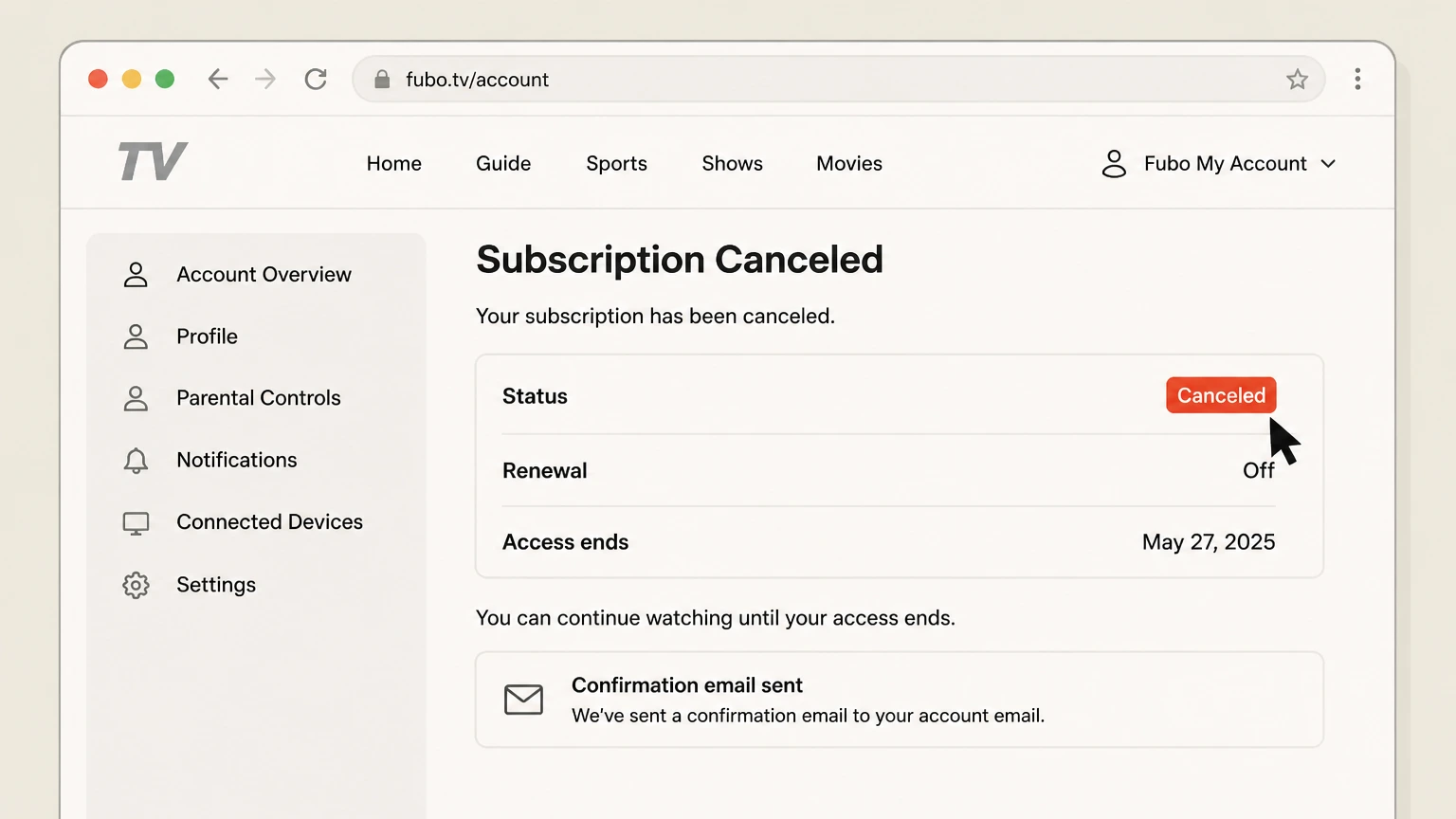
4Save the status and date
Keep the account confirmation and email.

Roku · Verify this billing owner
Cancel Fubo through Roku
 1
1Open Roku subscriptions
Sign in at my.roku.com and open Manage subscriptions.
 2
2Choose Fubo
Find the active subscription billed by Roku.
- Let Pine handle it
Pine can help
Too many steps?
Pine can find the right Roku path and handle the cancellation for you.
 3
3Turn off auto-renew
Choose the cancellation control and review the terms.
 4
4Confirm cancellation
Save the renewal status and access end date.
iOS · Verify this billing owner
Cancel Fubo through iOS
 1
1Open Settings
On an iPhone, open Settings while signed in to the Apple Account used for the purchase.
 2
2Tap your name
Open the Apple Account card at the top of Settings.
- Let Pine handle it
Pine can help
Too many steps?
Pine can find the right iOS path and handle the cancellation for you.
 3
3Open Subscriptions
Tap Subscriptions and wait for the active subscription list.
 4
4Choose Fubo
Open the Fubo subscription and verify the plan and renewal date.
 5
5Tap Cancel Subscription
Confirm the change and keep the expiration date shown by Apple.
Google Play · Verify this billing owner
Cancel Fubo through Google Play
 1
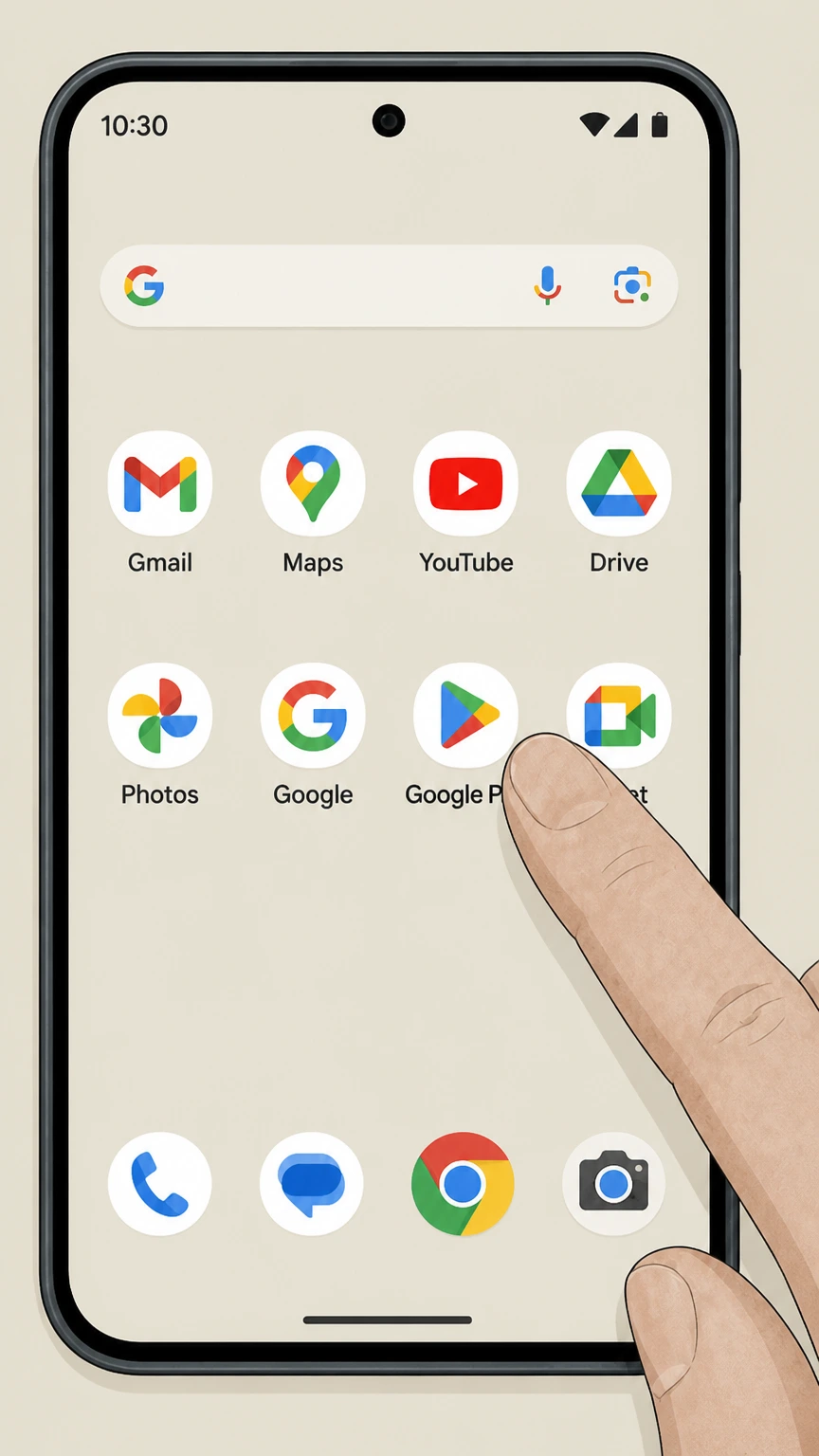
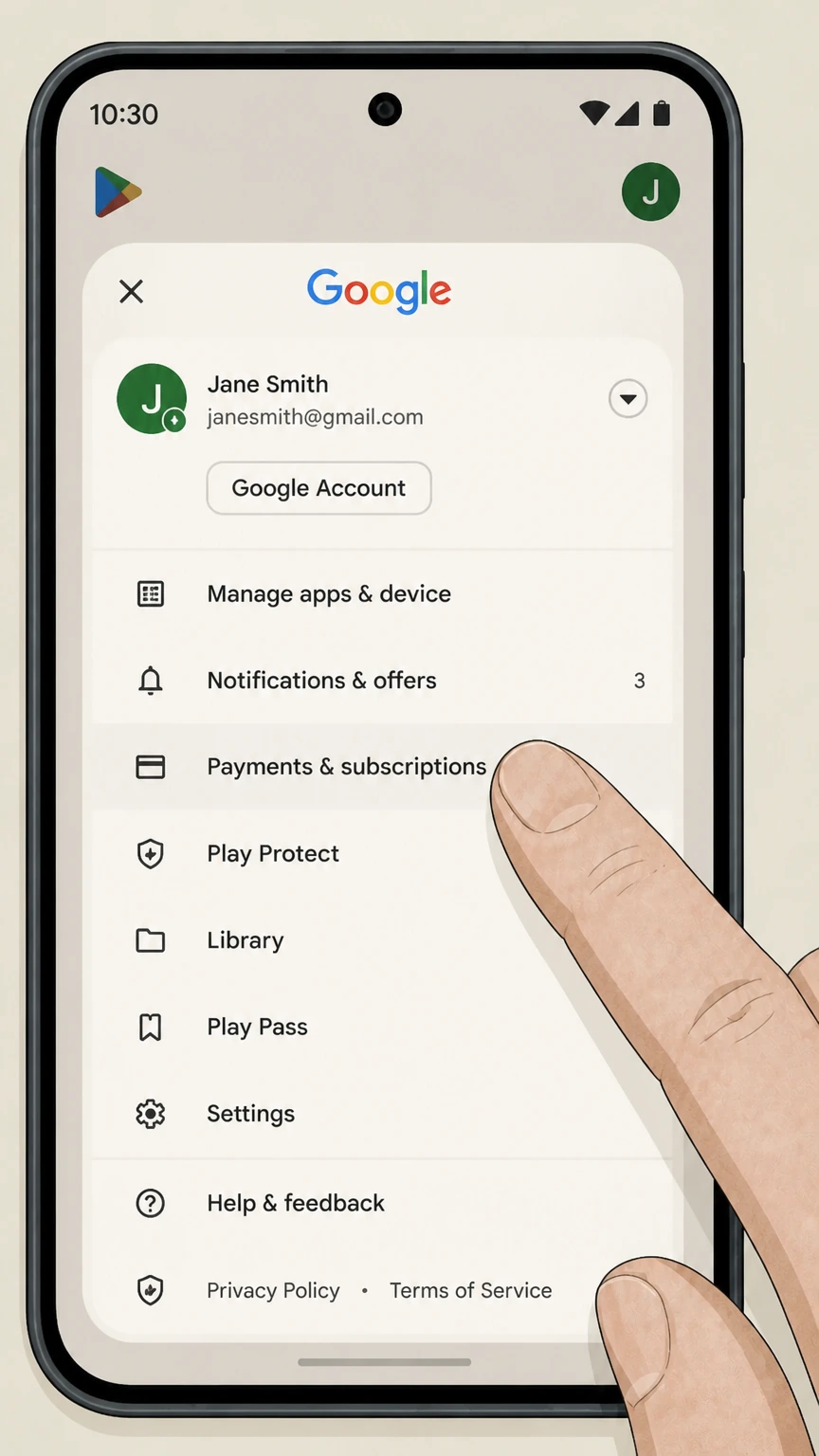
1Open Google Play
Use the Google account that purchased the subscription.
 2
2Open Payments & subscriptions
Tap the profile picture, then Payments & subscriptions.
- Let Pine handle it
Pine can help
Too many steps?
Pine can find the right Google Play path and handle the cancellation for you.
 3
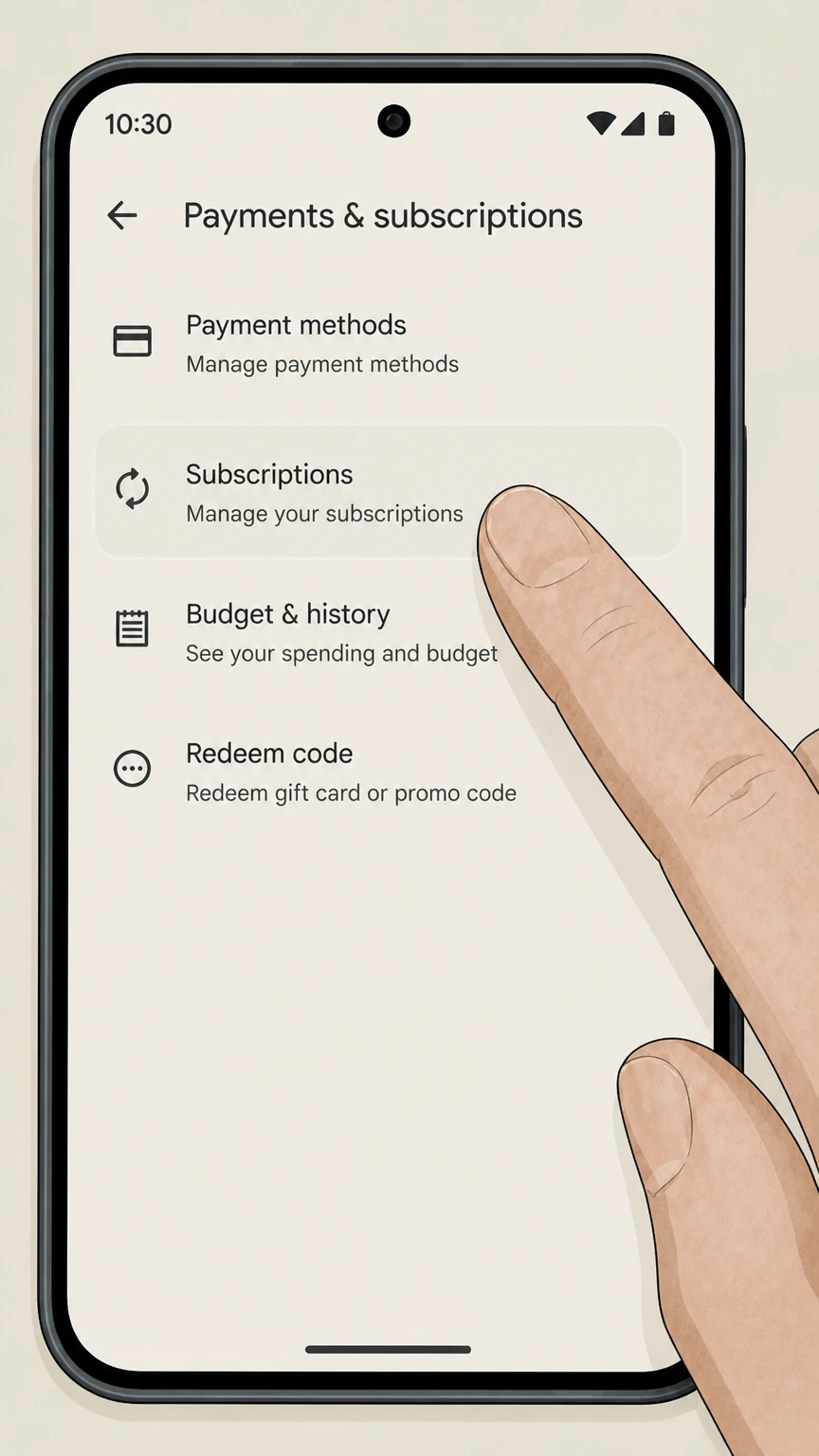
3Open Subscriptions
Find Fubo in the active subscription list.
 4
4Choose Fubo
Review the plan and next billing date before changing renewal.
 5
5Tap Cancel subscription
Choose a reason, finish the confirmation, and save the access end date.
Refund policy
Canceling Fubo does not automatically create a refund
Fubo’s policy generally does not provide partial-month refunds for cancellation. Platform-billed plans follow the platform policy, and local law can add rights.
Check my refund options- Renewal
- Fubo says a paid direct plan generally remains available through the current cycle, while canceling a direct free trial can end access immediately; the billing platform controls partner purchases.
- Refund boundary
- Fubo’s policy generally does not provide partial-month refunds for cancellation. Platform-billed plans follow the platform policy, and local law can add rights.
Check the signed-in subscription terms and the seller’s refund process before requesting review of a specific charge. Fubo cancellation guide
Choose the right route
Who controls a Fubo cancellation
Fubo’s official guide separates direct web billing from Roku and other platform billing; use the seller shown in My Account or the receipt. Deleting an app, signing out, or removing a viewing profile does not by itself stop a recurring charge.
Trial versus paid plan
A direct free trial can end immediately, unlike a paid term that normally continues to its end date.
Pause is not cancellation
A paused plan can resume; confirm that renewal is canceled if that is the intended result.
Add-ons
Review premium channels and add-ons shown in Subscription & Billing before confirming.
Keep proof
What to record before and after cancellation
Capture the account and billing details before changing renewal, then retain the final result in case another charge appears.
Before cancellation
Save the plan, seller, amount, renewal date, and account email shown on the receipt or subscription page.
At confirmation
Save the canceled or expiring status, effective date, confirmation number, and email.
After cancellation
Check separately billed add-ons and compare any later charge with the seller shown in the saved receipt.
Troubleshooting
Why the cancellation control may be missing
A missing button usually means the subscription is under a different account, already set to expire, or billed by another company.
Wrong account
Search purchase emails and try the email or store account named on the receipt.
Wrong billing owner
If the provider page names a partner, finish cancellation in that partner account.
Incomplete flow
A retention offer, pause choice, or reason screen is not final confirmation.
Fubo cancellation questions
Answers are tied to the official sources checked on August 4, 2026; signed-in terms and local law still control your account.
How do I cancel my Fubo subscription?
Can I cancel Fubo in the app?
What happens after I cancel Fubo?
Will Fubo refund the latest charge?
Why is Fubo not letting me unsubscribe?
Does deleting Fubo stop billing?
What proof should I keep after canceling Fubo?
Untangle this Fubo issue.
Let Pine handle the provider follow-up and keep the confirmation in one place.
