If you are looking for reliable how to cancel ChatGPT account removal steps, you probably don’t want a philosophy lesson on the future of OpenAI—you just want the account gone and your data safe. But here is the reality check: hitting "delete" isn't always enough to stop the billing cycle or secure your chat history.
I’m Millie, and I treat digital hygiene as seriously as I treat testing new AI models. Before you rush to delete your ChatGPT account, there are two critical pre-steps—canceling your subscription and exporting your data—that most guides gloss over. I documented my exact process, verified the 30-day recovery window, and created this deletion proof checklist. This guide isn't just about closing an account; it's about making sure it stays closed, with zero risk of phantom charges or lost insights.
While we can't automate every aspect of your digital hygiene instantly, we can handle the heavy lifting of phone calls and email negotiations. Explore Pine AI with our success-based model—you only pay when we successfully complete your cancellation or bill negotiation.
Two things to do before deleting
If you only take one thing from this post, let it be this: deleting your account is the last step. There are two things worth doing first so you don't end up with surprise charges or lost data.
Cancel active Plus subscription
If you're on ChatGPT Plus (or any paid plan), cancel it first. I'm not saying this because I enjoy extra steps, I'm saying it because billing and account deletion don't always behave the way people assume they will.
Here's what I checked:
- Web Users: I looked for an active subscription inside my account and followed the official steps on how do I cancel my ChatGPT Plus subscription.

- Android Users: I also checked the place I originally subscribed. If you used the Play Store, check how to cancel a subscription in the ChatGPT Android App.

- iOS Users: If you subscribed through the Apple App Store, cancellation must happen there. See how do I cancel my Apple subscription for ChatGPT Plus.

Why I bother with this: I've tested enough subscriptions to know that "delete" and "stop billing" are sometimes treated as separate systems. For a more detailed breakdown, you can read my full guide on how to cancel ChatGPT Plus subscription. Canceling first reduces the odds you'll be chasing down a charge later.
Export your conversation data

Before you delete anything, decide whether you want a copy of your chats.
I didn't export because I'm sentimental: I exported because I use chat logs like working notes. Sometimes a thread has a draft, a list of action items, or a snippet I might want later.
A quick reality check: once you close ChatGPT permanently, you should assume you've also closed the door on easy access to your history. If you might need anything from those conversations, client-related prompts, saved templates, or even just receipts of what was said, please export my ChatGPT history and data. I don't guess. I verify.
If you're even 10% unsure, export. It's the lowest-effort insurance policy in this whole process.
Delete steps
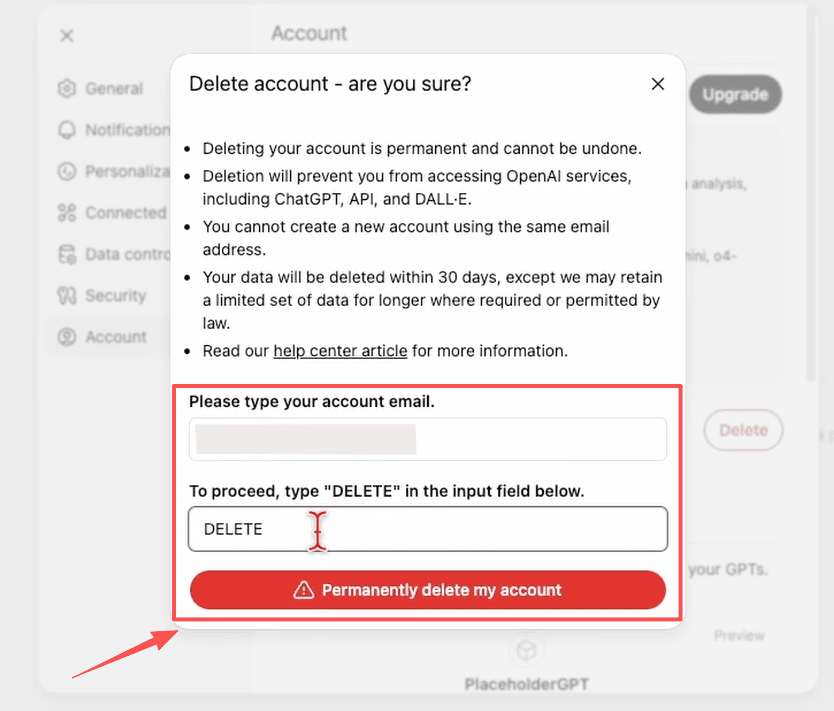
This is the part you came for: the actual "how do I delete it" flow. I went straight to the part that mattered most, the part where it actually lets you delete your account without hunting through help pages.
Settings → Account → Delete Account
The path I used inside ChatGPT was:
- Settings
- Account
- Delete Account
If you're searching for general cancel ChatGPT subscription or removal advice, that's the exact sequence that got me to the right button. A small note from someone who lives inside too many apps: settings menus get redesigned. If the labels shift slightly, what you're looking for is still the data/privacy area. "Delete account" tends to live where exports, training controls, and privacy toggles live. For transparency on how your data is handled before you wipe it, you can visit the OpenAI Privacy Portal.
Confirmation screen and email
Once you hit delete, you'll get a confirmation flow. Take it seriously. This is not the moment to click quickly and hope for the best.
I watched for two things:
- An on-screen confirmation that the deletion request went through.
- A follow-up email, because when I'm closing an account, I want a paper trail.
If you're aiming to delete an OpenAI profile (or what people casually call that), this is where you should slow down. The confirmation step is what separates "I tried to delete it" from "it's actually in motion."
And yes, I kept the email. Not forever. But long enough that if something weird happened with access or billing, I could point to a timestamp and say: here. This is when I requested deletion.
30-day recovery window

This is the part that's easy to miss when you're in a hurry: account deletion typically comes with a window where you can reverse course.
I'm mentioning it because professionals don't just delete accounts for fun. Sometimes you're cleaning up subscriptions. Sometimes a security concern spooked you. Sometimes you're just pruning tools you don't use.
Whatever your reason, it helps to know what "deleted" really means in the first month.
How to reactivate if you change your mind
During the recovery window (commonly 30 days), reactivation is usually straightforward.
What I'd do if I changed my mind:
- Try logging in with the same email/identity method I used before.
- Follow any prompts that indicate reactivation is available.
The key idea: if you realize you deleted the wrong account, or you need a conversation history you forgot to export, don't wait around. Handle it while the window is still open.
This is also why I recommend canceling billing first and exporting data. It keeps you in control even if you end up reactivating, because reactivating shouldn't mean accidentally reactivating a charge you didn't want.
After 30 days, no recovery
After the window closes, treat it as final. No "maybe support can bring it back," no fingers crossed. You will likely encounter a message stating oops, you do not have an account because it has been deleted or deactivated.
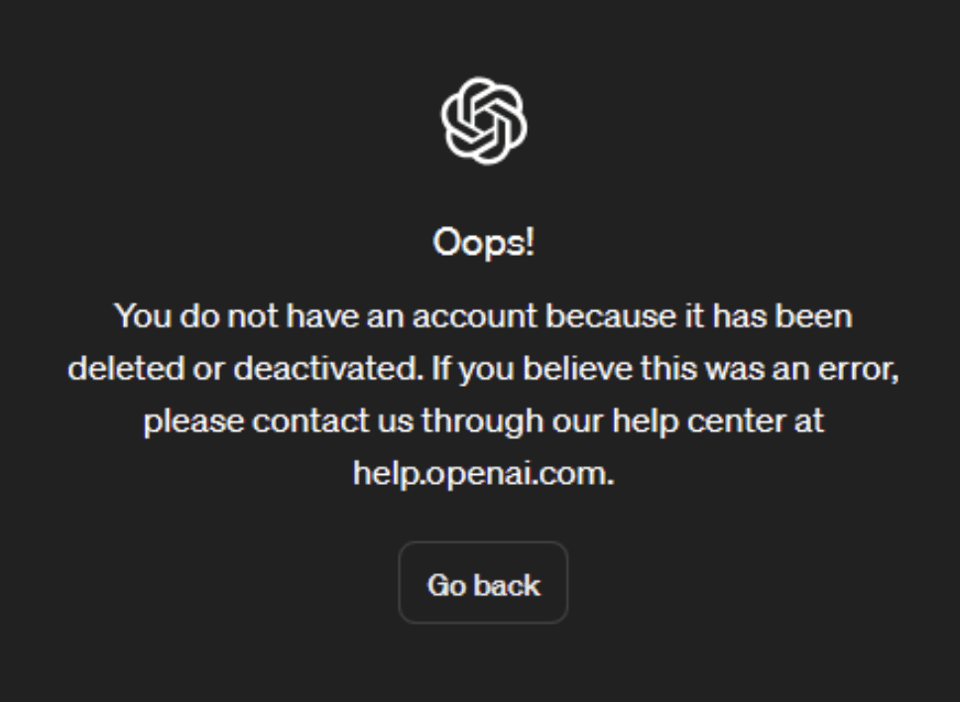
If your goal is to remove a ChatGPT account and keep it gone, that's good news, because it means the deletion isn't just cosmetic.
If your goal is to step away temporarily, that's your cue to pause and think: would a logout, a subscription cancellation, or a data-setting change solve the problem without burning the whole thing down?
I'm not here to talk you out of it. I'm here to make sure the decision you make is the one that sticks.
Deletion proof checklist
When I delete an account, I want confirmation that would hold up in my own personal court of "I refuse to deal with this again." Here's the quick checklist I used to confirm the chatgpt delete confirmation was real.
Confirmation email details
I looked for an email that clearly indicated the account deletion was requested/processed.
Specifically:
- A recognizable sender associated with the service
- A timestamp (when the deletion was initiated)
- Language that indicates deletion is underway, not just "you changed a setting"
I also recommend saving that email somewhere you'll actually find it later. I flagged mine. If you're the kind of person who's always at "999+ unread," future-you will appreciate the breadcrumb.
Account inaccessible = deletion confirmed
Then I tested the most practical proof of all: I tried to access the account again.
If you can't log in and you're seeing messaging that the account doesn't exist or isn't accessible (especially after the process completes), that's the confirmation that matters.
At that point, from a practical standpoint, you've effectively closed ChatGPT permanently.
One last thing I'll say, colleague-to-colleague: if you're deleting because you're tired of managing subscriptions and support processes in general, I get it. Half the battle is not the button, it's the uncertainty. I've laid out everything you need. The rest is up to you.