Cancel Subscription with Pine AI
logo
pine
Tidal

How to Cancel Tidal Subscription (2025 Guide) - Stop Charges

Cancel your Tidal subscription easily on iPhone, Android, or Desktop. Save up to $203/year and avoid hidden fees. Step-by-step guide inside.

Last Edited on 20 Dec, 2025
Chloe Anne-Bennett, Streaming & Entertainment Editor
8 min read

Tidal, launched in 2014, promised high-fidelity audio but often just delivers high bills. With subscriptions costing $10.99 to $16.99, you could save up to $203 yearly by cutting the cord. Whether you use iOS, Android, or desktop, Visit Tidal to manage your account. Maybe you signed up for the Renaissance hype or high-res audio, but now you are over it. Pissed Consumer reports over 1.2K calls regarding "unexpected charges" and "login errors" recently. Users on TrustPilot frequently flag poor support during outages. With recent layoffs at parent company Block making headlines, it is a smart time to leave.

How to Cancel Tidal on iPhone (iOS)

If you subscribed via the App Store, you must cancel through Apple. Deleting the app does nothing.

1 Open Settings

Tap the grey Settings gear icon on your home screen. Do not open the Tidal app itself because Apple handles the billing if you signed up there.

2 Tap Your Name

Click your Apple ID name at the very top of the list. It is usually right above Airplane Mode.

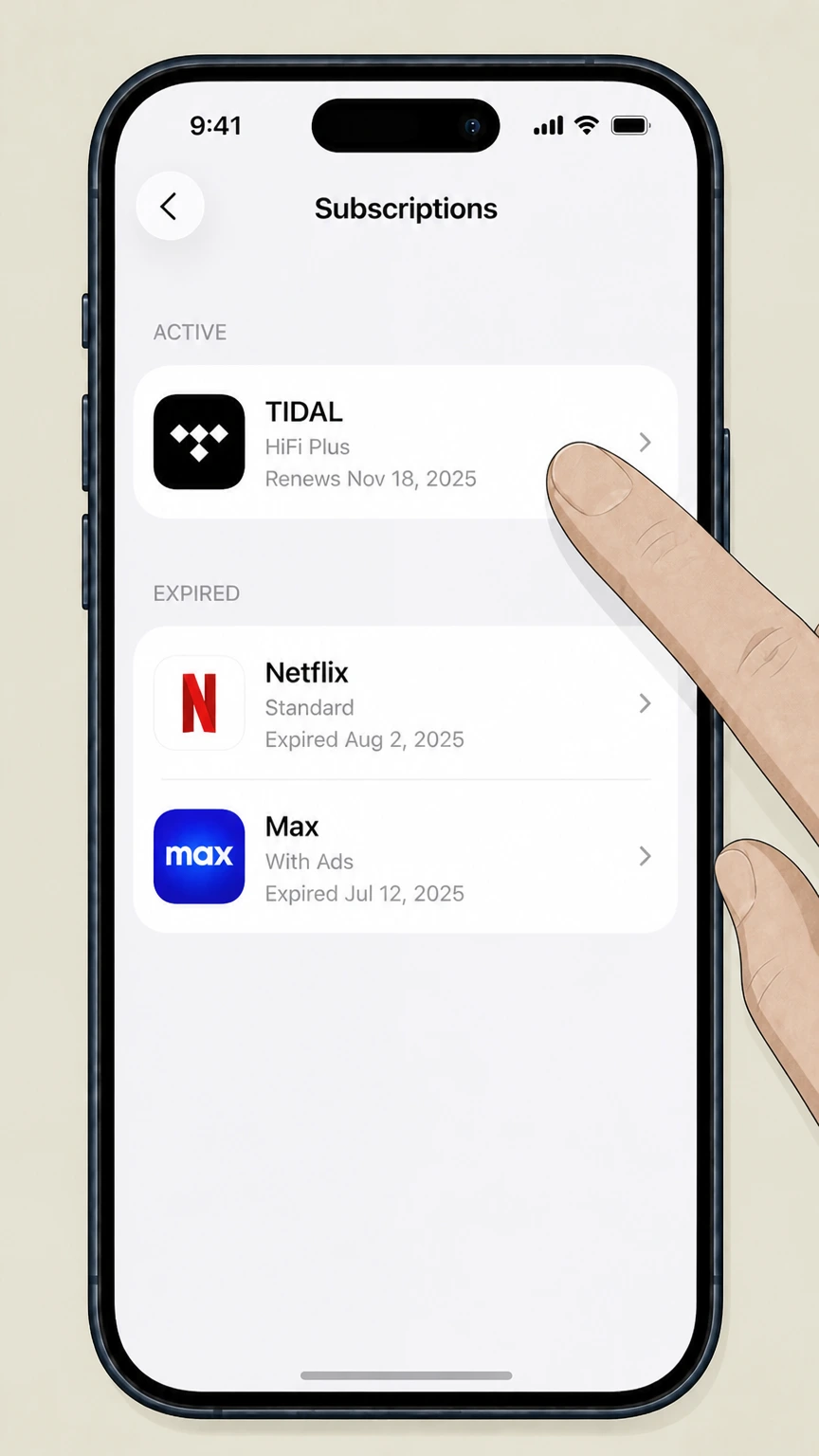
3 Select Subscriptions

Tap Subscriptions. If you do not see it, check under 'Media & Purchases' instead.

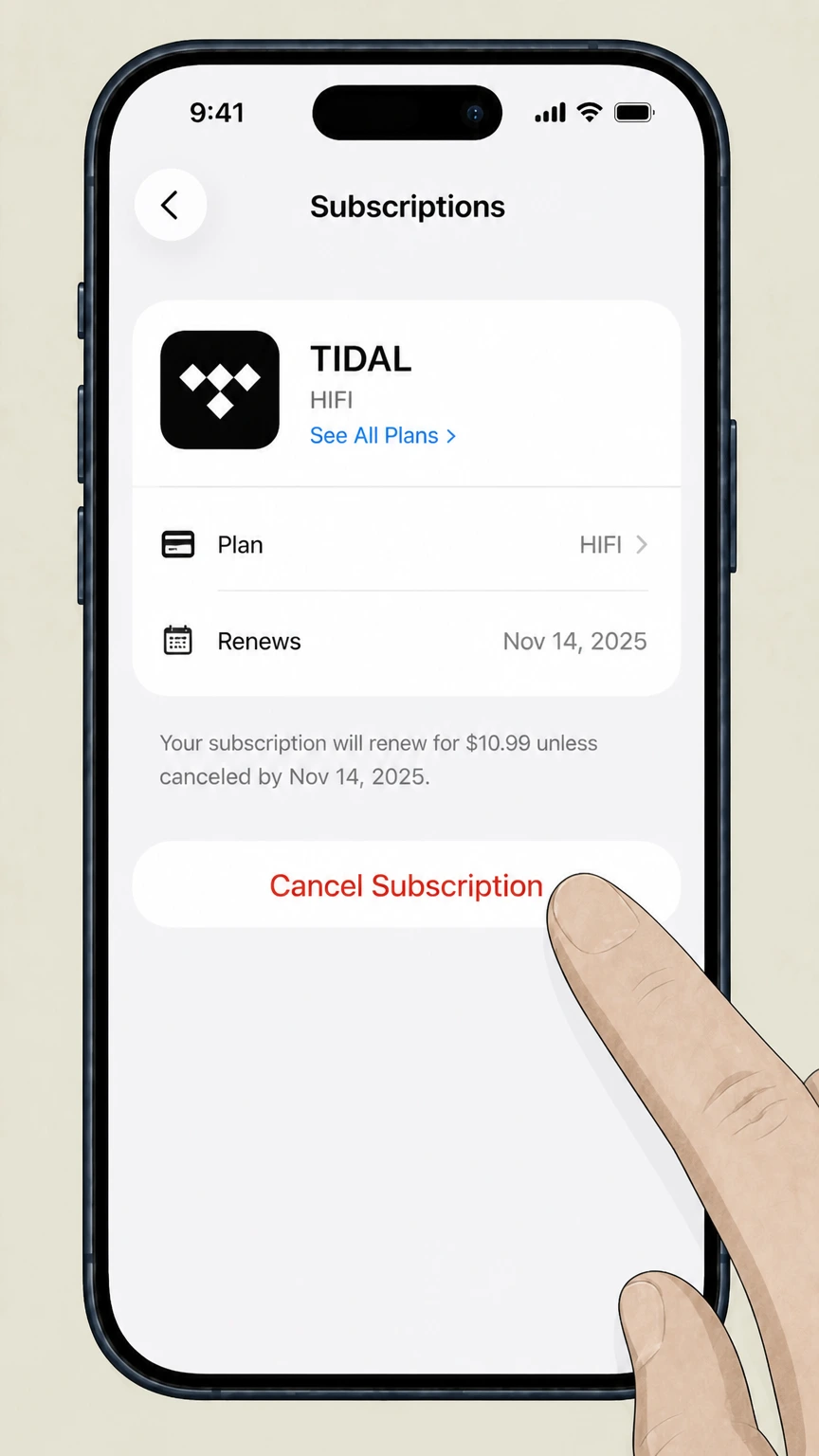
4 Cancel Subscription

Find Tidal in the list. Tap Cancel Subscription. If you only see 'Renew', it is already cancelled.

How to Cancel Tidal on Android

Android users usually pay via Google Play. Here is how to stop the bleeding.

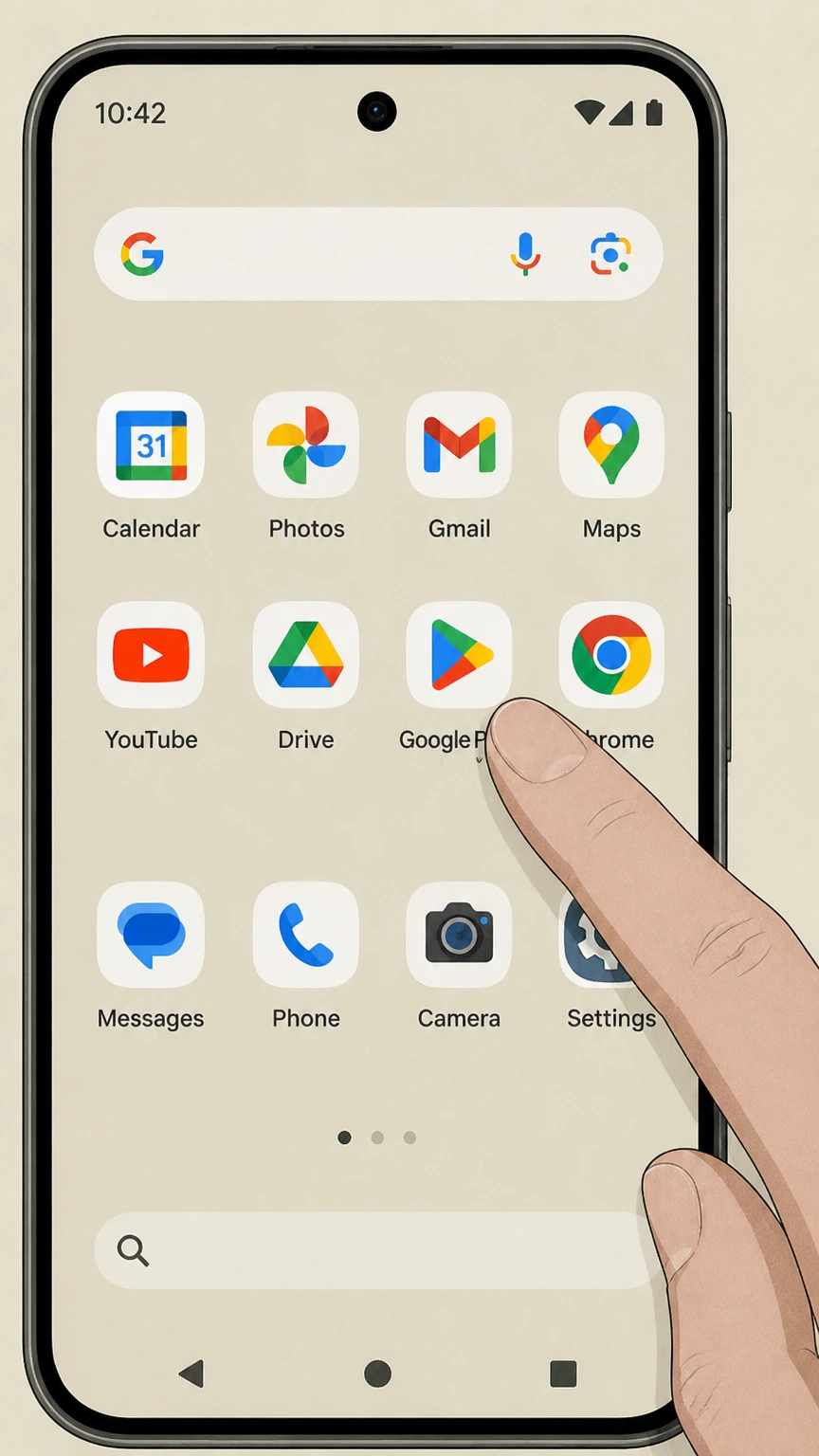
1 Open Google Play Store

Launch the Play Store app. Make sure you are signed into the correct Google account.

2 Tap Profile Icon

Tap your profile picture in the top right corner.

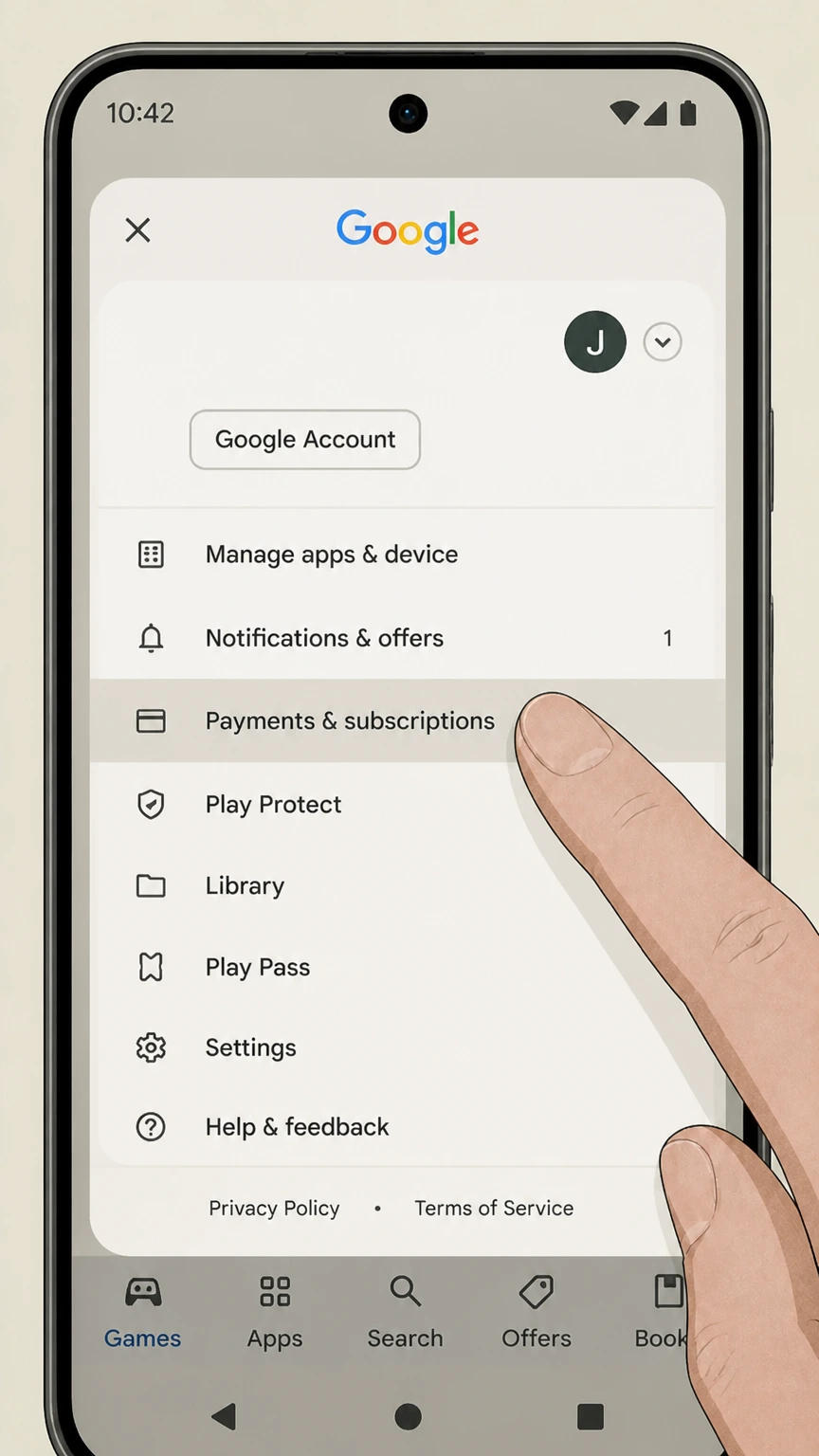
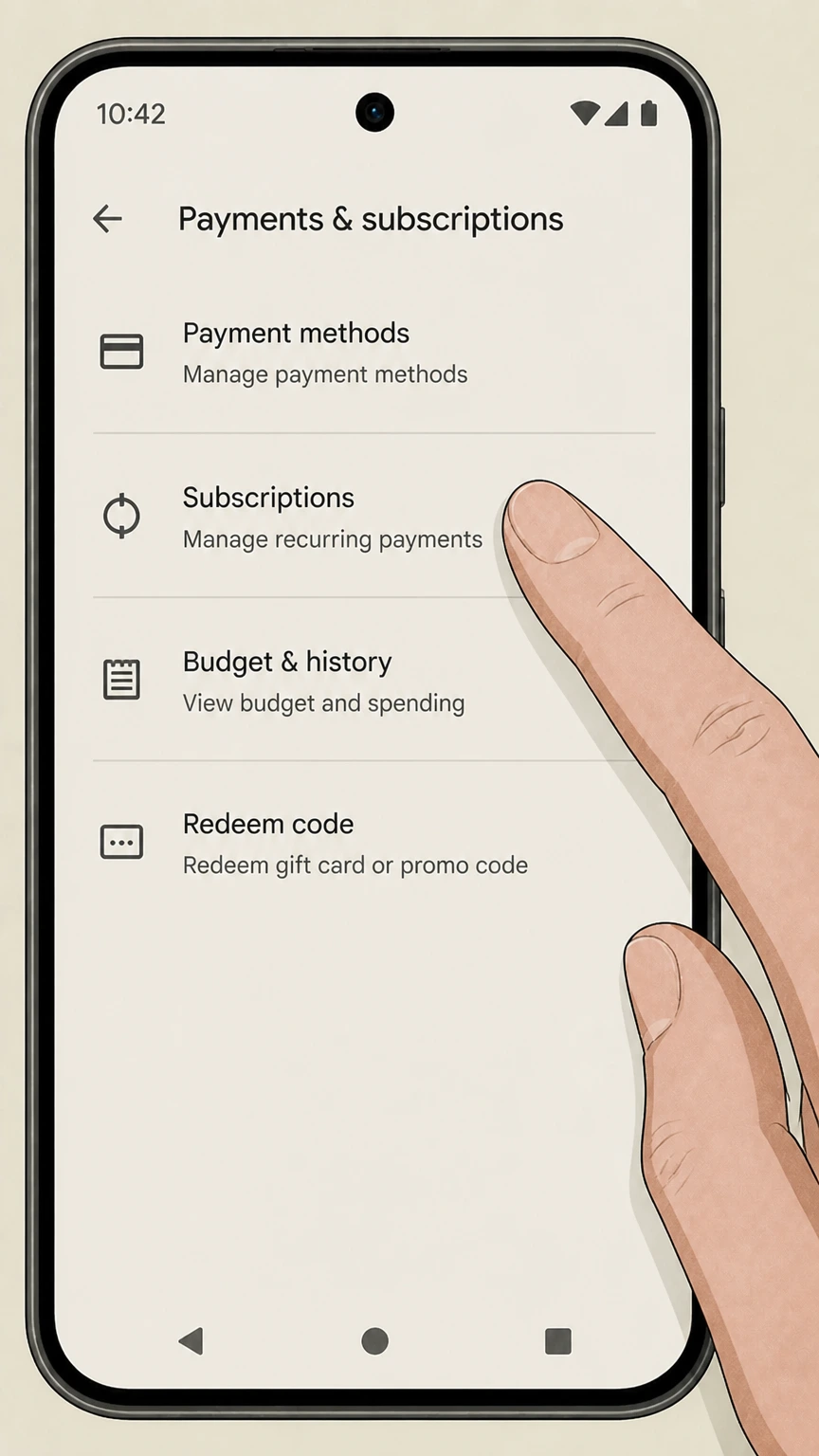
3 Payments & Subscriptions

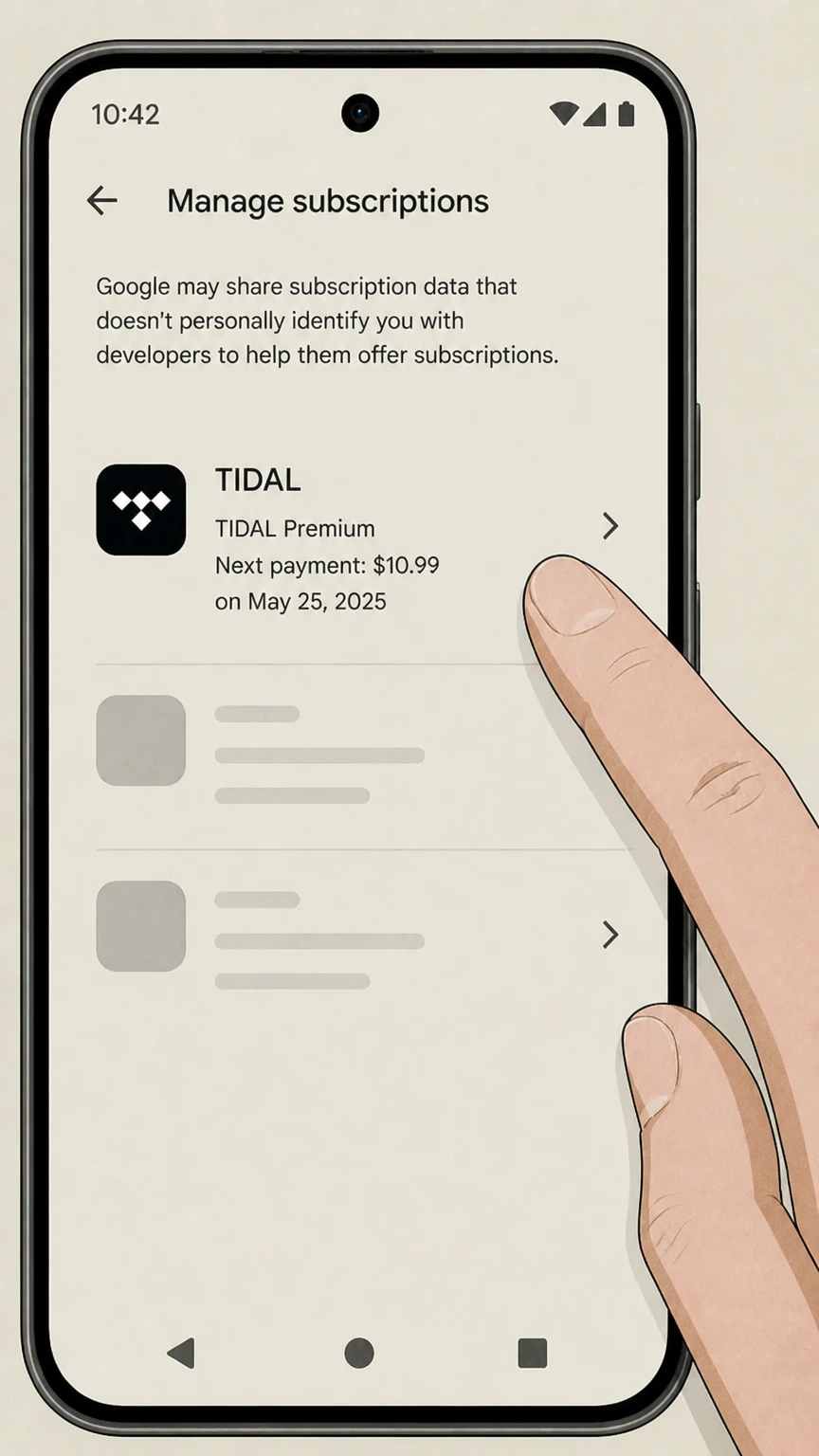
Select Payments & subscriptions and then tap Subscriptions.

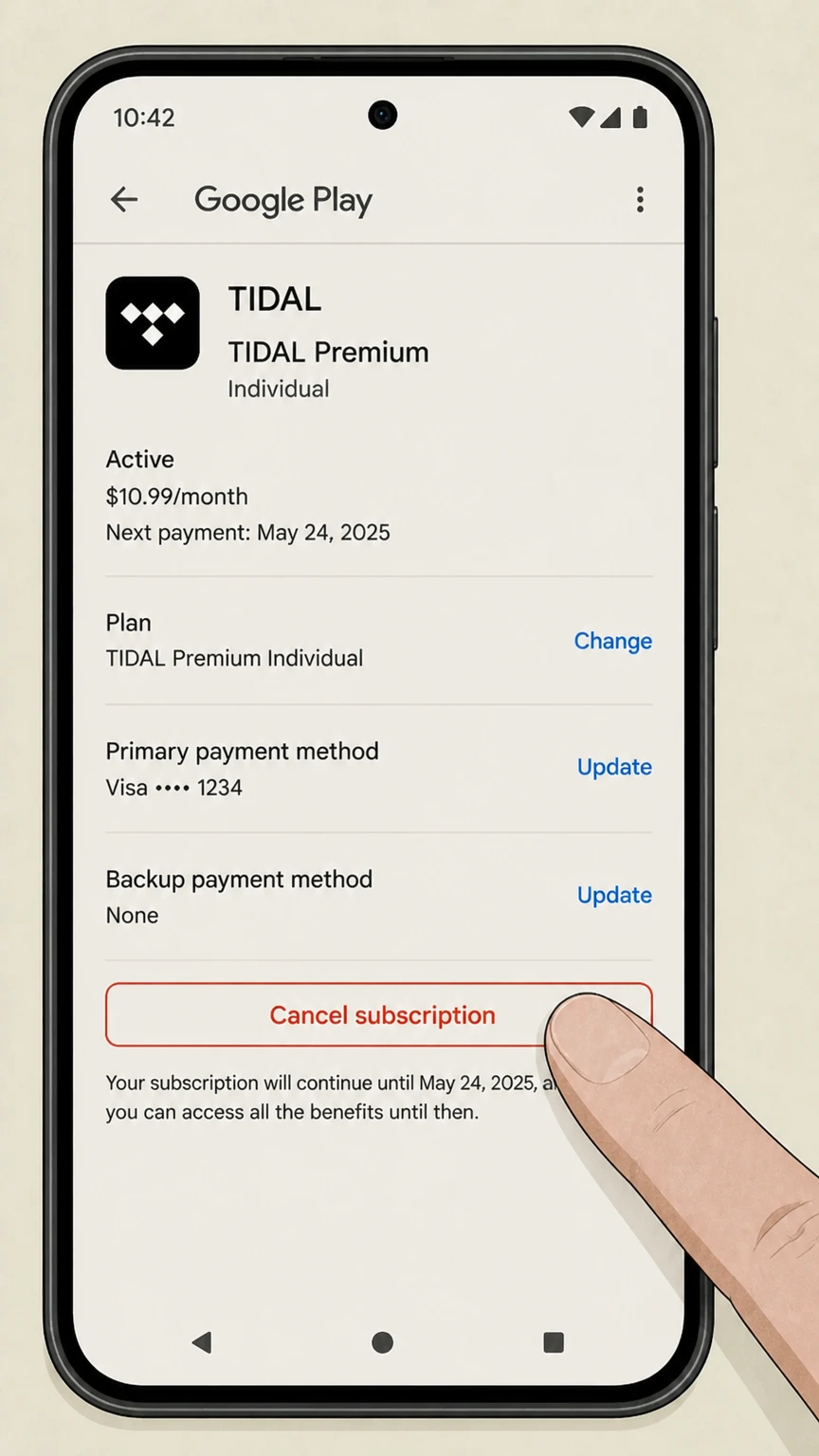
4 Cancel Tidal

Select Tidal from the list and tap Cancel subscription. Follow the confirmation prompts to finish.

How to Cancel Tidal on Desktop

This is the most reliable method if you signed up directly with a credit card.

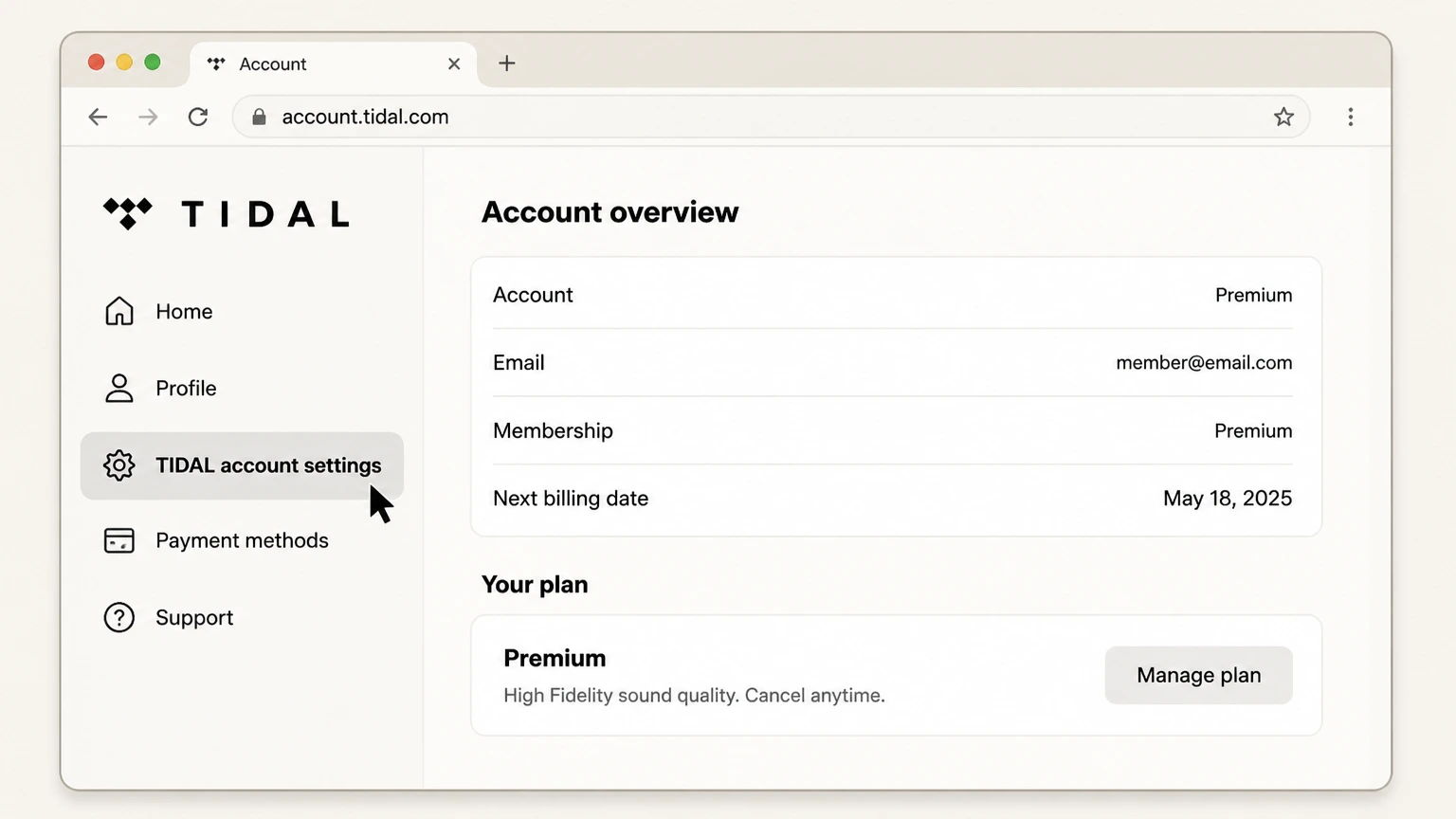
1 Go to Tidal Website

Navigate to account.tidal.com and log in. The mobile site is glitchy, so use a laptop if you can.

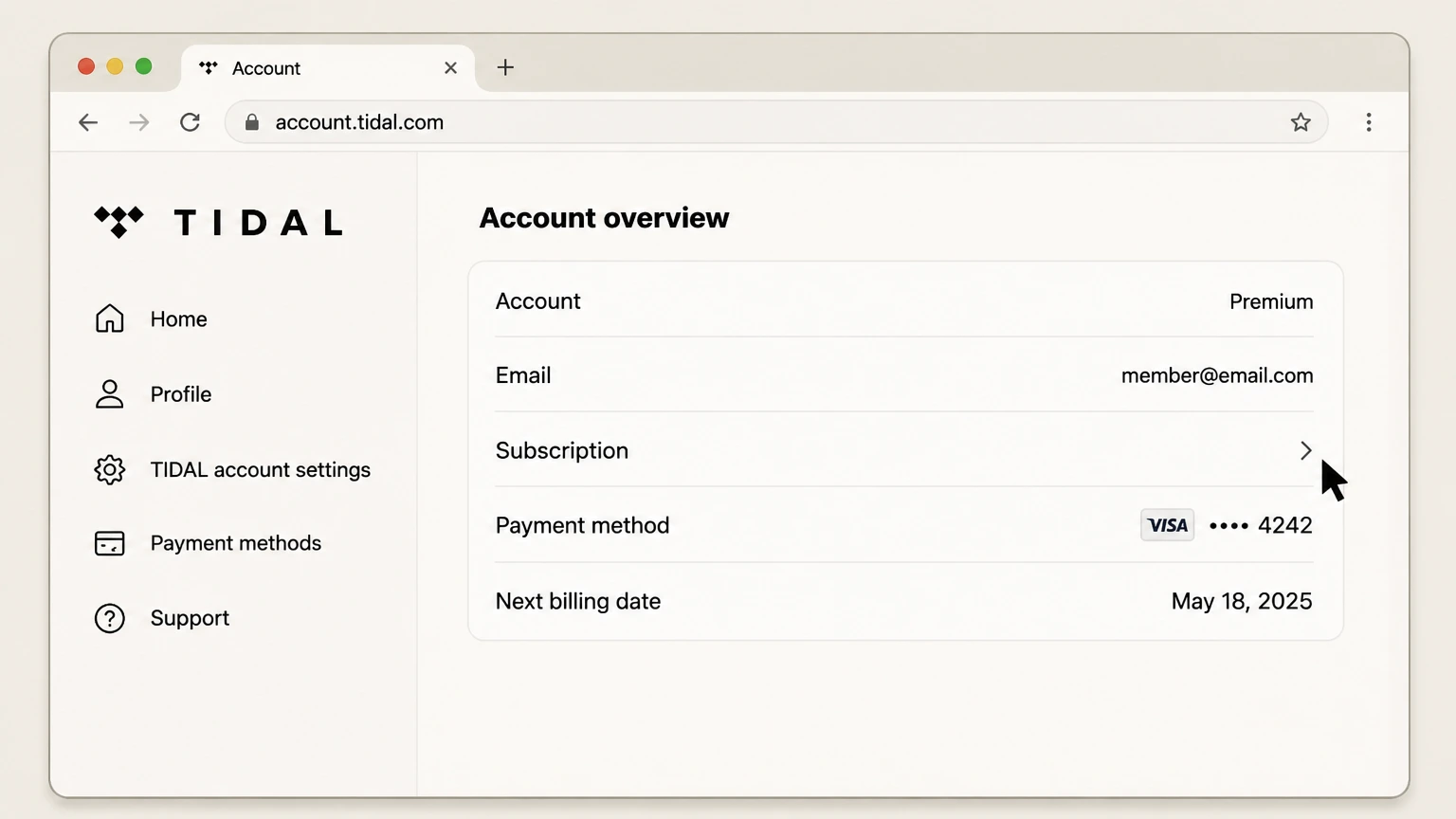
2 Access Subscription

Click on Subscription in the menu. You might have to verify your password again.

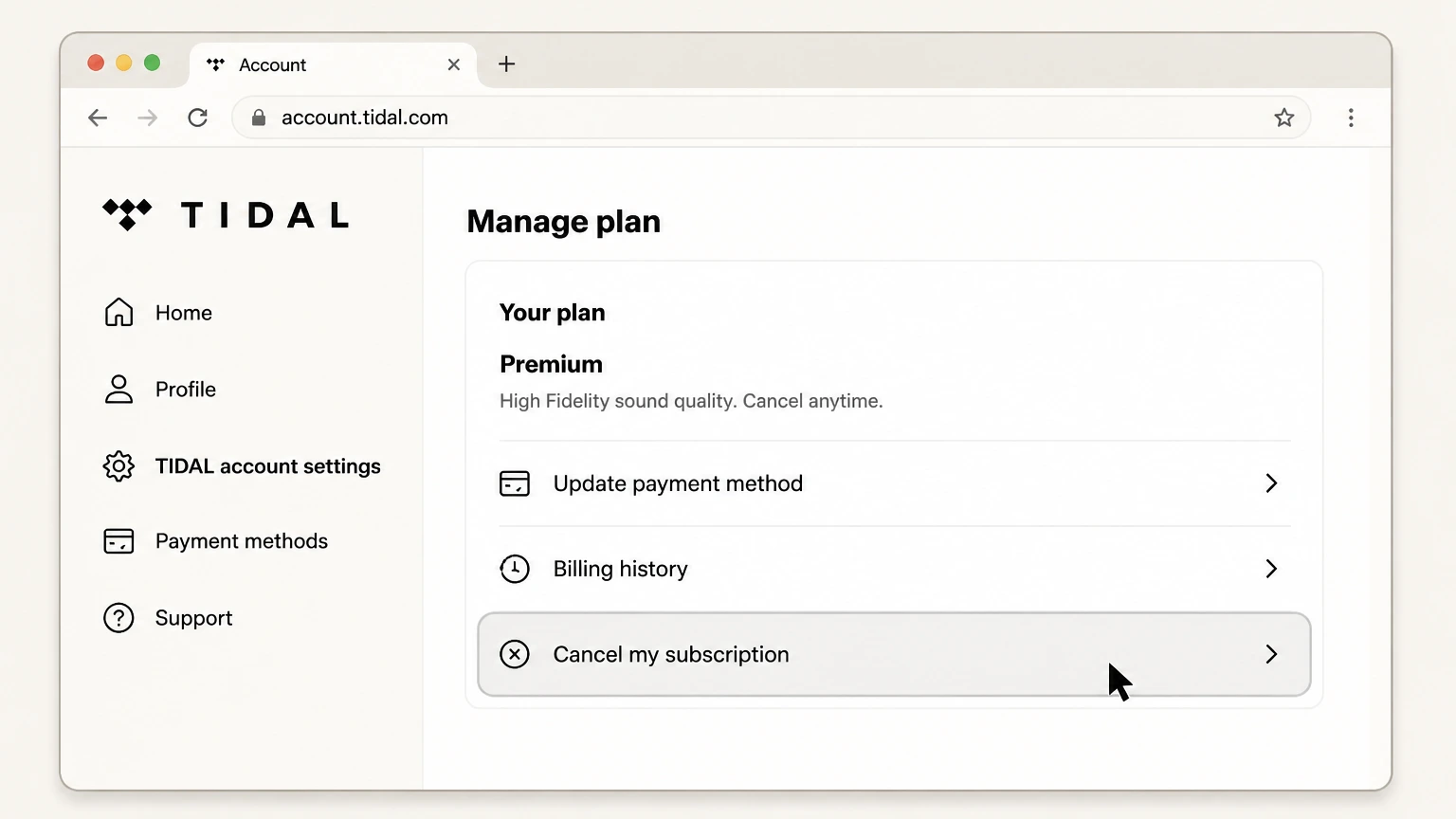
3 Initiate Cancellation

Click Cancel my subscription. They will try to keep you with a survey.

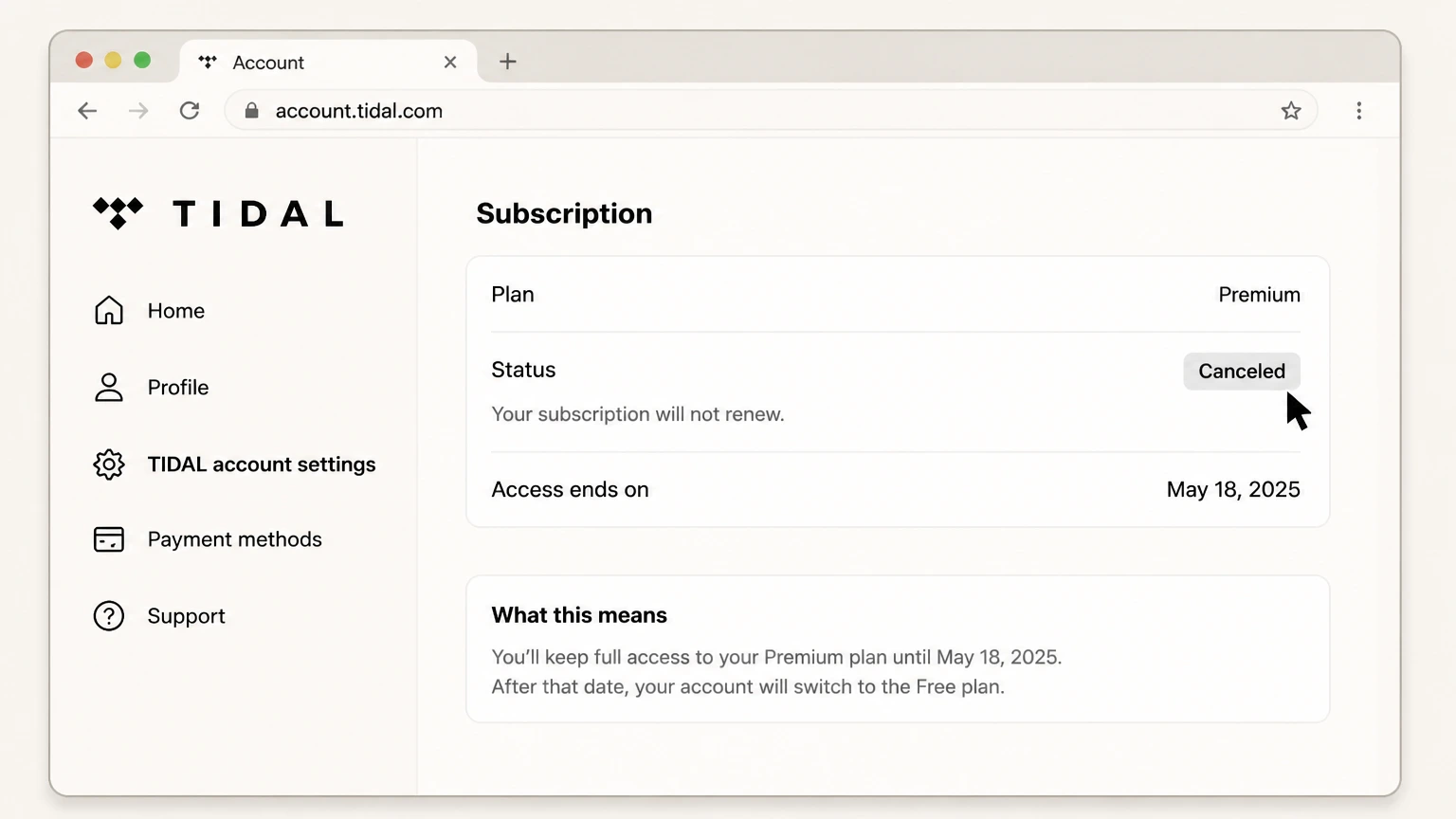
4 Confirm

Keep clicking the confirmation buttons until you see a final screen saying your subscription will end on a specific date.

What is Tidal Cancellation Policy

Tidal operates on a strict "no refunds" basis. Once that charge hits your card, the money is gone. You can cancel at any time, and your access will continue until the end of your current billing cycle. For example, if you pay on the 1st and cancel on the 2nd, you still have service for 29 days. Users on Reddit frequently complain that cancelling during a free trial sometimes triggers an immediate cutoff, so watch out for that.

Before You Cancel Tidal: What You Should Know

Before you pull the plug, know that your playlists are at risk. Tidal generally keeps your data for a few months in case you come back, but there is no guarantee. If you have spent hours curating the perfect gym mix, use a service like Soundiiz to transfer your playlists to Spotify or Apple Music first. Also, check if you are on a "Best Buy" or "Sprint" (now T-Mobile) promotion. Cancelling those often requires contacting the carrier directly, not Tidal.

Having Trouble Cancelling Your Tidal Subscription?

Stuck in a loop? You are not alone. Here are common fixes:

  • Third-Party Billing: If you do not see a cancel button on the Tidal site, you likely paid through a partner like T-Mobile, Best Buy, or Apple. Check your bank statement to see who is actually charging you.
  • Browser Issues: Ad-blockers sometimes hide the cancel button. Try opening the page in Incognito mode.
  • Forgot Login: If you used "Sign in with Apple" or Facebook, you must log in that same way to cancel.
  • Contact Support: If all else fails, submit a request via their help center, but expect a delay.

Subscription Plans and Pricing (2025)

Plan Monthly Price Details
Individual $10.99 Standard sound quality, ad-free, 1 account.
Family $16.99 Up to 6 accounts, same features as Individual.
Student $4.99 Discounted rate for verified students (50% off).
DJ Extension +$9.00 Add-on for DJ integrations.

How Pine AI Can Help You Cancel Your Tidal Subscription

With streaming prices hiking across the board in the last 12 months, cutting Tidal is a solid move to reclaim your budget. Pine AI makes it effortless.

  • Step 1: Let's get started to cancel Tidal Simply tell us that you want to cancel your subscription with Tidal, we'll ask for some account details to get started.

  • Step 2: Pine gets to work We navigate the confusing clicks, wait on hold, and handle the awkward conversations to ensure it's actually cancelled. We don't just suggest it; we finish it.

  • Step 3: You're free from Tidal The payments stop and you get your time back. No "retention offers," no run-around, just a confirmed "one-and-done" result.

Start with Pine AI

Frequently Asked Questions about Tidal

Can I unsubscribe from Tidal anytime?icon-hide

Yeah, you can bail whenever. Just know that if you cancel mid-month, you don't get your money back for the remaining days. It just stays active until the date runs out.

Nope. Their policy is pretty brutal on this. I tried arguing with support once about a renewal that happened 2 hours prior, and they just pasted the T&Cs at me. Zero luck.

You should get an email confirmation. Also, check the account page; it should say "Expires on [Date]" instead of "Renews on." If it still says renews, you are still paying.

Instantly. The moment you click the button.

Transfer your music first. Seriously. Once your account goes dormant, those playlists you spent three years building might vanish into the digital void. Use a transfer tool.

Good luck. You can try their support ticket system, but it feels like shouting into a void. Twitter (X) sometimes works better if you tag them publicly.

We do the dirty work. You give us the details, we navigate the menus or sit on hold so you don't have to deal with the headache.

Pine AI is an independent consumer assistance service. We are not affiliated with, endorsed by, or sponsored by Tidal or any other company mentioned on this site.

Chloe Anne-Bennett

Chloe Anne-Bennett

Streaming & Entertainment Editor

Chloe Anne-Bennett is the Streaming & Entertainment Editor at Pine AI. Chloe is a leading voice on the business of streaming, entertainment and the evolving landscape of digital media. Before contributing to Pine AI, Chloe was an entertainment correspondent for a major news outlet, where she reported on everything from box office trends to the impact of streaming services on traditional media. At Pine AI, Chloe leverages her deep industry knowledge to provide our readers with insightful analysis of the latest trends, helping them make sense of their subscriptions and where to hit the sweet spots in how to handle customer service reps.

More Tidal Resources

Need help with other Tidal services? Check out these helpful guides:

More Streaming and Entertainment providers for cancelling your subscription

Discover other popular Streaming and Entertainment providers, and see how Pine AI could help you with tricky subscription cancellation issues.

How to Cancel Kaltura Subscription (2026 Guide)

How to Cancel Kaltura Subscription (2026 Guide)

How to Cancel Gaia Subscription (2026 Guide)

How to Cancel Gaia Subscription (2026 Guide)

How to Cancel Sundance Now Subscription (2026 Guide)

How to Cancel Sundance Now Subscription (2026 Guide)

How to Cancel CuriosityStream Subscription (2026)

How to Cancel CuriosityStream Subscription (2026)

How to Cancel Apple Music

How to Cancel Apple Music

How to Cancel Restream Subscription (2025 Guide)

How to Cancel Restream Subscription (2025 Guide)

How to Cancel Epix Now Subscription (2025 Guide)

How to Cancel Epix Now Subscription (2025 Guide)

How to Cancel Spotify Subscription (2025 Guide)

How to Cancel Spotify Subscription (2025 Guide)

How to Cancel tving Subscription (2025 Guide)

How to Cancel tving Subscription (2025 Guide)

How to Cancel Sky Go Subscription (2025 Guide)

How to Cancel Sky Go Subscription (2025 Guide)

How to Cancel StarTimes ON Subscription (2025 Guide)

How to Cancel StarTimes ON Subscription (2025 Guide)

How to Cancel Vimeo Subscription (2025 Guide)

How to Cancel Vimeo Subscription (2025 Guide)

How to Cancel Hallmark Movies Now Subscription (2025 Guide)

How to Cancel Hallmark Movies Now Subscription (2025 Guide)

How to Cancel ESPN Subscription (2025 Guide)

How to Cancel ESPN Subscription (2025 Guide)

How to Cancel CDA Subscription (2025) - iOS, Android & Web

How to Cancel CDA Subscription (2025) - iOS, Android & Web

How to Cancel Streamz Subscription (2025 Guide)

How to Cancel Streamz Subscription (2025 Guide)

How to Cancel NOW TV Subscription (2025 Guide)

How to Cancel NOW TV Subscription (2025 Guide)

How to Cancel Nintendo Online Subscription (2025 Guide)

How to Cancel Nintendo Online Subscription (2025 Guide)

How to Cancel Showmax Subscription (2025 Guide)

How to Cancel Showmax Subscription (2025 Guide)

How to Cancel The Criterion Channel Subscription (2025 Guide)

How to Cancel The Criterion Channel Subscription (2025 Guide)

How to Cancel Atresmedia

How to Cancel Atresmedia

How to Cancel Docomo Subscription (2025 Guide)

How to Cancel Docomo Subscription (2025 Guide)

How to Cancel Netflix Subscription (2025 Guide)

How to Cancel Netflix Subscription (2025 Guide)

How to Cancel Polsat Subscription (2025 Guide)

How to Cancel Polsat Subscription (2025 Guide)

How to Cancel FOX Nation Subscription (2025 Guide)

How to Cancel FOX Nation Subscription (2025 Guide)

How to Cancel Claro TV Subscription (2025 Guide)

How to Cancel Claro TV Subscription (2025 Guide)

How to Cancel DAZN Subscription (2025 Guide)

How to Cancel DAZN Subscription (2025 Guide)

How to Cancel GO3 Subscription (2025 Guide) - Easy Steps

How to Cancel GO3 Subscription (2025 Guide) - Easy Steps

How to Cancel Geoguessr Subscription (2025 Guide)

How to Cancel Geoguessr Subscription (2025 Guide)

How to Cancel Minecraft Realms Subscription (2025 Guide)

How to Cancel Minecraft Realms Subscription (2025 Guide)

How to Cancel Viaplay Subscription (2025 Guide)

How to Cancel Viaplay Subscription (2025 Guide)

How to Cancel Exxen Subscription (2025 Guide)

How to Cancel Exxen Subscription (2025 Guide)

How to Cancel Amazon Prime

How to Cancel Amazon Prime

How to Cancel EA Play Subscription (2025 Guide)

How to Cancel EA Play Subscription (2025 Guide)

How to Cancel WatchIT Subscription (2025 Guide)

How to Cancel WatchIT Subscription (2025 Guide)

How to Cancel Steam Subscription (2025 Guide) - Stop Recurring Charges

How to Cancel Steam Subscription (2025 Guide) - Stop Recurring Charges

How to Cancel Shahid Subscription (2025 Guide)

How to Cancel Shahid Subscription (2025 Guide)

How to Cancel Ubisoft Plus Subscription (2025 Guide)

How to Cancel Ubisoft Plus Subscription (2025 Guide)

How to Cancel DStv Subscription (2025 Guide)

How to Cancel DStv Subscription (2025 Guide)

How to Cancel Kayo Sports Subscription (2025 Guide)

How to Cancel Kayo Sports Subscription (2025 Guide)

How to Cancel SonyLiv Subscription (2025 Guide)

How to Cancel SonyLiv Subscription (2025 Guide)

How to Cancel Megogo Subscription (2025 Guide)

How to Cancel Megogo Subscription (2025 Guide)

How to Cancel MLB.TV Subscription (2025 Guide)

How to Cancel MLB.TV Subscription (2025 Guide)

How to Cancel RTL Plus Subscription (2025 Guide)

How to Cancel RTL Plus Subscription (2025 Guide)

How to Cancel beIN SPORTS CONNECT

How to Cancel beIN SPORTS CONNECT

How to Cancel Zee5 Subscription (2025 Guide) - iOS, Android & Web

How to Cancel Zee5 Subscription (2025 Guide) - iOS, Android & Web

How to Cancel BINGE

How to Cancel BINGE

How to Cancel Curiosity Stream Subscription (2025 Guide)

How to Cancel Curiosity Stream Subscription (2025 Guide)

How to Cancel Canal Plus Subscription (2025 Guide)

How to Cancel Canal Plus Subscription (2025 Guide)

How to Cancel Videoland Subscription (2025 Guide)

How to Cancel Videoland Subscription (2025 Guide)

How to Cancel HBO Max Subscription (2025 Guide)

How to Cancel HBO Max Subscription (2025 Guide)

How to Cancel BlazeTV

How to Cancel BlazeTV

How to Cancel iQIYI Subscription (2025 Guide)

How to Cancel iQIYI Subscription (2025 Guide)

How to Cancel History Vault Subscription (2025 Guide)

How to Cancel History Vault Subscription (2025 Guide)

How to Cancel TV+ Subscription (2025 Guide)

How to Cancel TV+ Subscription (2025 Guide)

How to Cancel Eros Now Subscription (2025 Guide)

How to Cancel Eros Now Subscription (2025 Guide)

How to Cancel movistar+ Subscription (2025 Guide)

How to Cancel movistar+ Subscription (2025 Guide)

How to Cancel an A&E Crime Central Subscription

How to Cancel an A&E Crime Central Subscription

How to Cancel Disney Plus Subscription (2025 Guide)

How to Cancel Disney Plus Subscription (2025 Guide)

How to Cancel Mediaset Subscription (2025 Guide)

How to Cancel Mediaset Subscription (2025 Guide)

How to Cancel Globoplay Subscription (2025 Guide)

How to Cancel Globoplay Subscription (2025 Guide)

How to Cancel ivi TV Subscription (2025 Guide)

How to Cancel ivi TV Subscription (2025 Guide)

How to Cancel ALTBalaji, ALTT, or Kutingg

How to Cancel ALTBalaji, ALTT, or Kutingg

How to Cancel AMC+

How to Cancel AMC+

How to Cancel Crunchyroll Subscription (2025 Guide)

How to Cancel Crunchyroll Subscription (2025 Guide)

How to Cancel Coupang Subscription (2025 Guide)

How to Cancel Coupang Subscription (2025 Guide)

How to Cancel Tencent Video Subscription (2025 Guide)

How to Cancel Tencent Video Subscription (2025 Guide)

How to Cancel FuboTV Subscription (2025 Guide)

How to Cancel FuboTV Subscription (2025 Guide)

How to Cancel TV2 Norge Subscription (2025 Guide)

How to Cancel TV2 Norge Subscription (2025 Guide)

How to Cancel TV 2 Subscription (2025 Guide)

How to Cancel TV 2 Subscription (2025 Guide)

How to Cancel Tivubu Subscription (2025 Guide)

How to Cancel Tivubu Subscription (2025 Guide)

How to Cancel Joyn Subscription (2025) - iOS, Android & Web

How to Cancel Joyn Subscription (2025) - iOS, Android & Web

How to Cancel Hulu Subscription (2025 Guide)

How to Cancel Hulu Subscription (2025 Guide)

How to Cancel Viu Subscription (2025 Guide)

How to Cancel Viu Subscription (2025 Guide)

How to Cancel Player Subscription (2025 Guide)

How to Cancel Player Subscription (2025 Guide)

How to Cancel ITV Subscription (2025 Guide) - iOS, Android & Web

How to Cancel ITV Subscription (2025 Guide) - iOS, Android & Web

How to Cancel BET+

How to Cancel BET+

How to Cancel TrueID Subscription (2025 Guide)

How to Cancel TrueID Subscription (2025 Guide)

How to Cancel Voyo Subscription (2025 Guide)

How to Cancel Voyo Subscription (2025 Guide)

How to Cancel Starz Subscription (2025 Guide)

How to Cancel Starz Subscription (2025 Guide)

How to Cancel ESPN Plus Subscription (2025 Guide)

How to Cancel ESPN Plus Subscription (2025 Guide)

How to Cancel WOW Subscription (2025 Guide)

How to Cancel WOW Subscription (2025 Guide)

How to Cancel BluTV / HBO Max Turkey

How to Cancel BluTV / HBO Max Turkey

How to Cancel Chegg Subscription (2025 Guide)

How to Cancel Chegg Subscription (2025 Guide)

How to Cancel Peacock Subscription (2025 Guide)

How to Cancel Peacock Subscription (2025 Guide)

How to Cancel Shudder Subscription (2025 Guide)

How to Cancel Shudder Subscription (2025 Guide)

How to Cancel Roku Subscription (2025 Guide)

How to Cancel Roku Subscription (2025 Guide)

How to Cancel Apple TV

How to Cancel Apple TV

How to Cancel MGM Plus Subscription (2025 Guide)

How to Cancel MGM Plus Subscription (2025 Guide)

How to Cancel Kyivstar Subscription (2025 Guide)

How to Cancel Kyivstar Subscription (2025 Guide)

How to Cancel NFL Plus Subscription (2025 Guide)

How to Cancel NFL Plus Subscription (2025 Guide)

How to Cancel TV4 Subscription (2025 Guide) - Stop Charges

How to Cancel TV4 Subscription (2025 Guide) - Stop Charges

How to Cancel SoundCloud Go Subscription (2025 Guide)

How to Cancel SoundCloud Go Subscription (2025 Guide)

How to Cancel Discovery Plus Subscription (2025 Guide)

How to Cancel Discovery Plus Subscription (2025 Guide)

How to Cancel U-Next Subscription (2025 Guide)

How to Cancel U-Next Subscription (2025 Guide)

How to Cancel Philo Subscription (2025 Guide) | Pine AI

How to Cancel Philo Subscription (2025 Guide) | Pine AI

How to Cancel MUBI Subscription (2025 Guide)

How to Cancel MUBI Subscription (2025 Guide)

How to Cancel iROKO Subscription (2025 Guide)

How to Cancel iROKO Subscription (2025 Guide)

How to Cancel Wavve Subscription (2025 Guide)

How to Cancel Wavve Subscription (2025 Guide)