


Chicago Tribune
Cancel subscription
Canceling Your Chicago Tribune Subscription Guide
Learn how to cancel Chicago Tribune through the right billing provider. Follow official steps, understand access timing, refunds, and the confirmation to keep.
- Official Chicago Tribune and billing-owner sources
- 3 provider-specific cancellation paths
- Refund and post-cancellation effects separated from renewal
- Verified August 16, 2026
Choose the Chicago Tribune cancellation path that matches who bills you
Phone – Tribune Publishing customer service · verify the billing owner
 1
1Find the official Chicago Tribune customer service number
Open Tribune Publishing’s Subscriber Terms contact table or the Chicago Tribune Customer Service page and locate the phone number listed for “Chicago Tribune.”
 2
2Call during posted customer service hours
Place a call to the Chicago Tribune customer service number during the hours shown for Chicago Tribune in the Subscriber Terms contact table.
- Let Pine handle it
Pine can help
Too many steps?
Pine can find the right Phone – Tribune Publishing customer service path and handle the cancellation for you.
 3
3Request cancellation of your subscription
Tell the representative that you want to cancel your Chicago Tribune subscription and specify whether it is print, digital, or a bundle.
 4
4Confirm the account and effective cancellation date
Provide any requested identifiers (such as your name, service address, or account number) and confirm which subscription should stop renewing and when billing should end.
 5
5Ask for written confirmation or a reference number
Before ending the call, ask the agent to confirm that auto‑renewal has been turned off and to send an email confirmation or provide a cancellation reference number for your records.

iOS – Apple App Store subscription · verify the billing owner
 1
1Open Settings
Unlock your iPhone or iPad and open the Settings app. Use the Chicago Tribune account named on your receipt, and continue only after the next status in this cancellation path is visible.
 2
2Tap your name
At the top of Settings, tap your name to open your Apple ID account settings. Use the Chicago Tribune account named on your receipt, and continue only after the next status in this cancellation path is visible.
- Let Pine handle it
Pine can help
Too many steps?
Pine can find the right iOS – Apple App Store subscription path and handle the cancellation for you.
 3
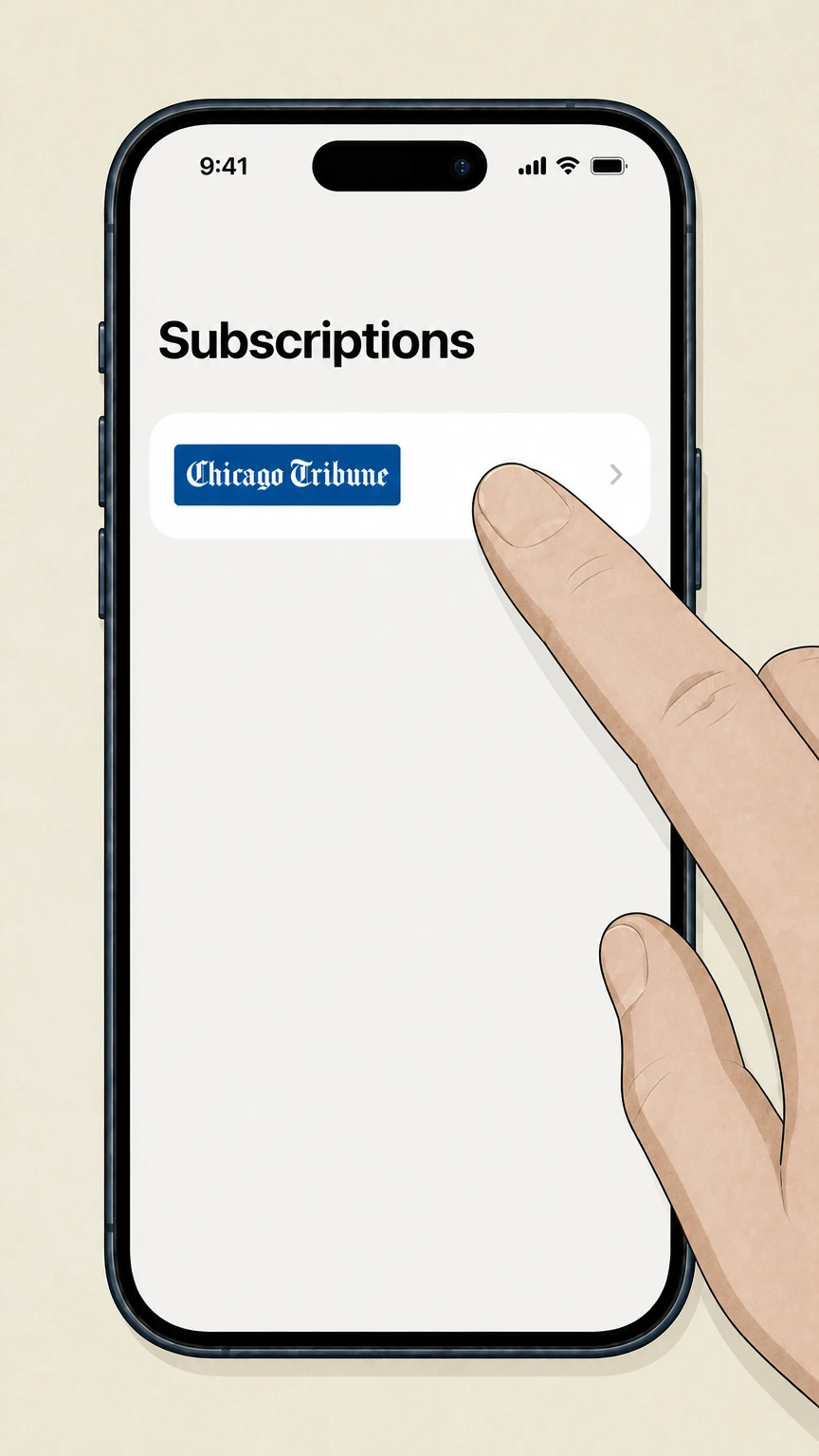
3Open Subscriptions
In your Apple ID screen, tap Subscriptions to see your active and expired subscriptions. Use the Chicago Tribune account named on your receipt, and continue only after the next status in this cancellation path is visible.
 4
4Select Chicago Tribune
In the list of active subscriptions, tap Chicago Tribune to open its subscription details. Use the Chicago Tribune account named on your receipt, and continue only after the next status in this cancellation path is visible.
 5
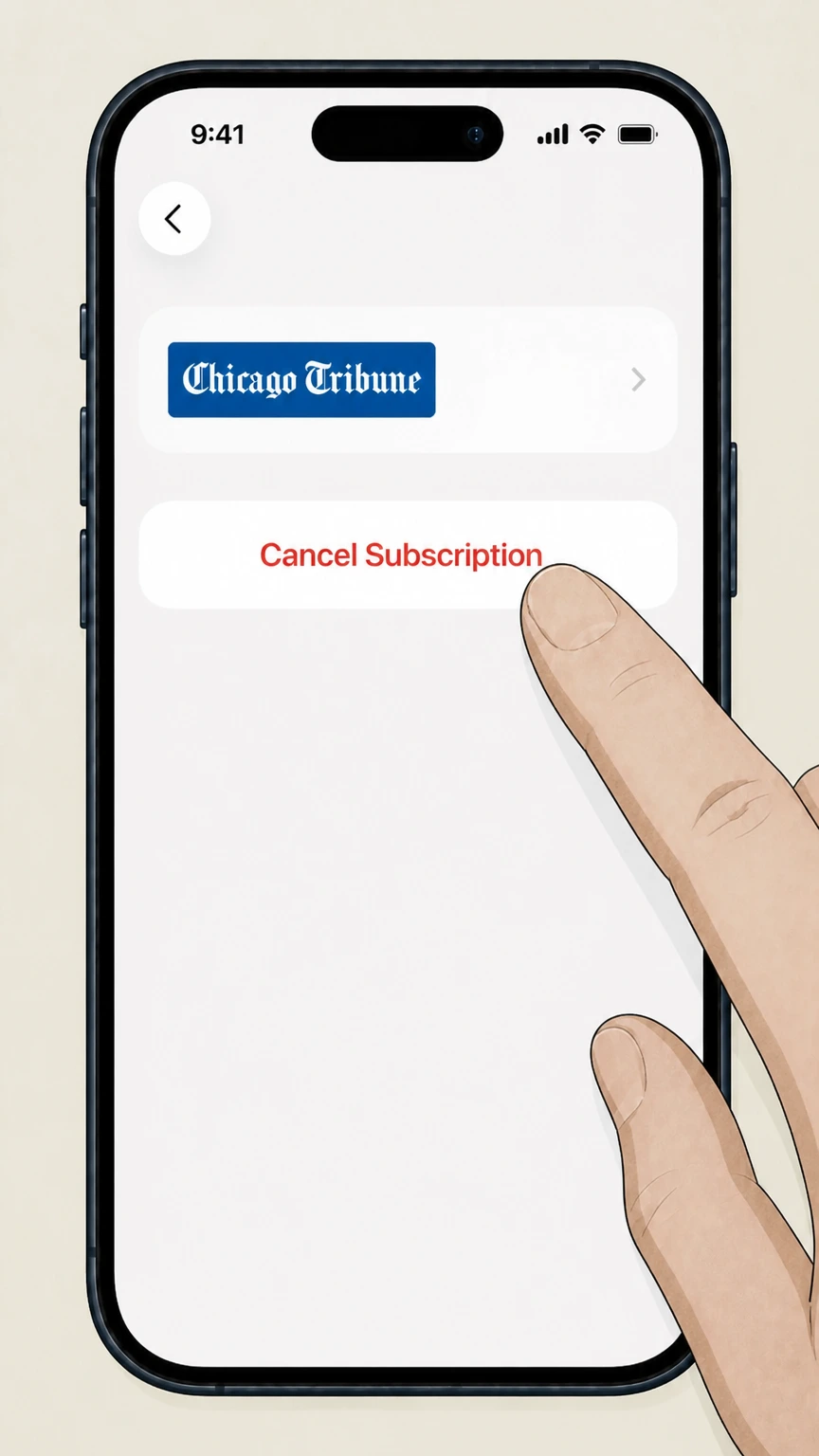
5Cancel the subscription
Tap Cancel Subscription and follow any prompts; if you instead see an expiration date and no Cancel button, the Chicago Tribune subscription is already canceled.
Google Play – Android subscription · verify the billing owner
 1
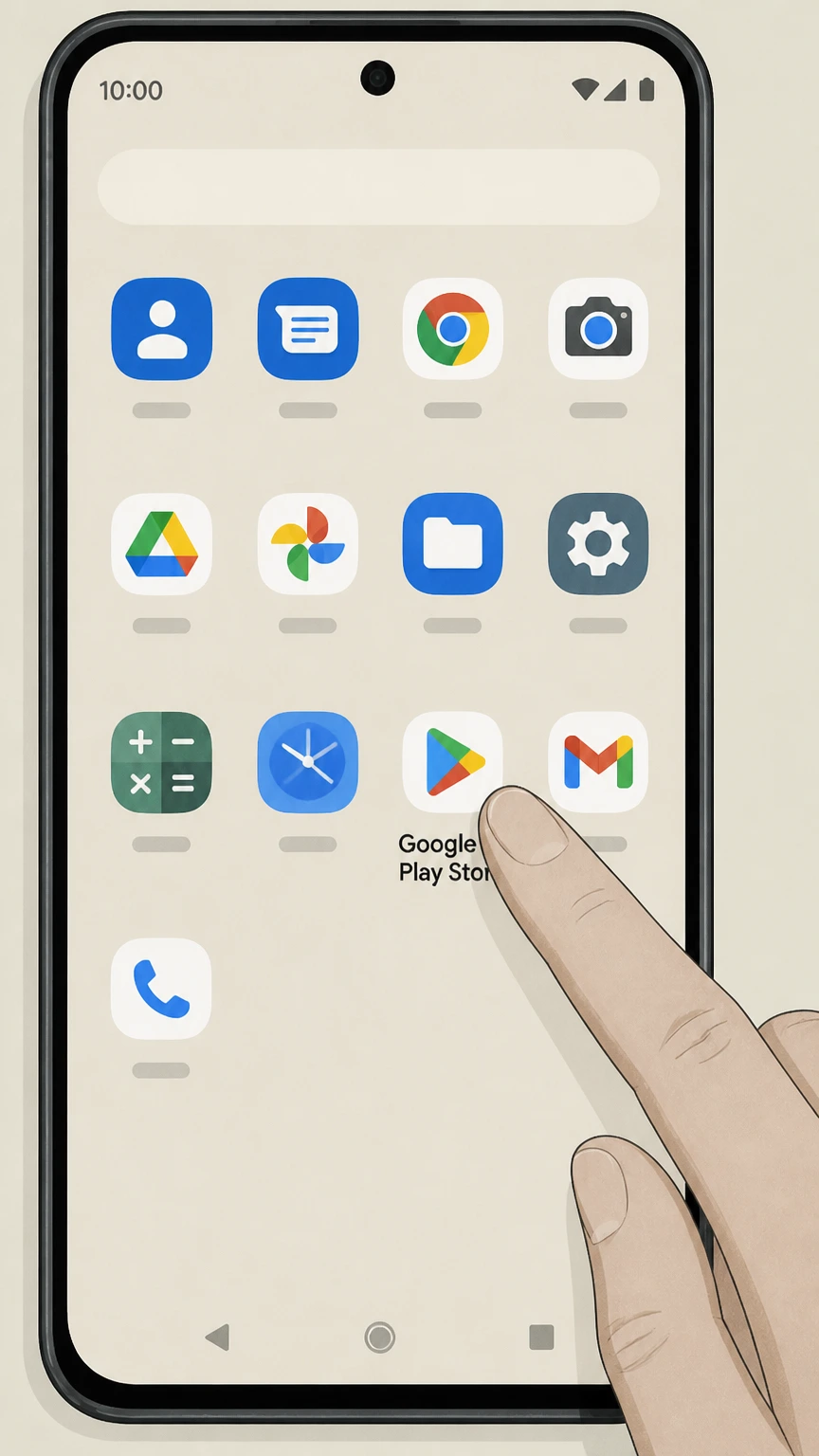
1Open the Google Play Store app
On your Android device, open the Google Play Store app from your home screen or app drawer. Use the Chicago Tribune account named on your receipt, and continue only after the next status in this cancellation path is visible.
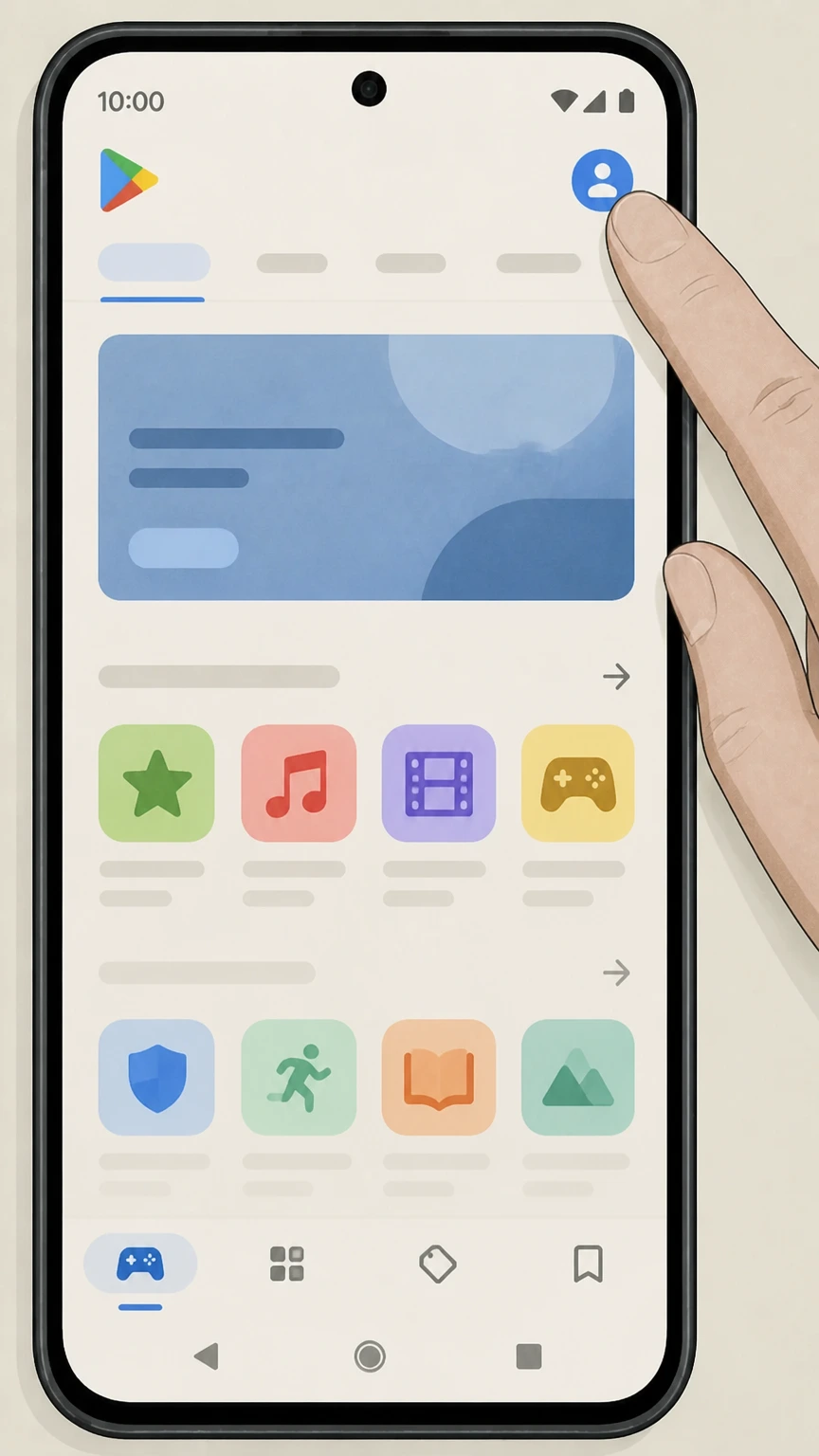 2
2Open your account menu
In Google Play, tap your profile icon in the top right corner to open the account menu. Use the Chicago Tribune account named on your receipt, and continue only after the next status in this cancellation path is visible.
- Let Pine handle it
Pine can help
Too many steps?
Pine can find the right Google Play – Android subscription path and handle the cancellation for you.
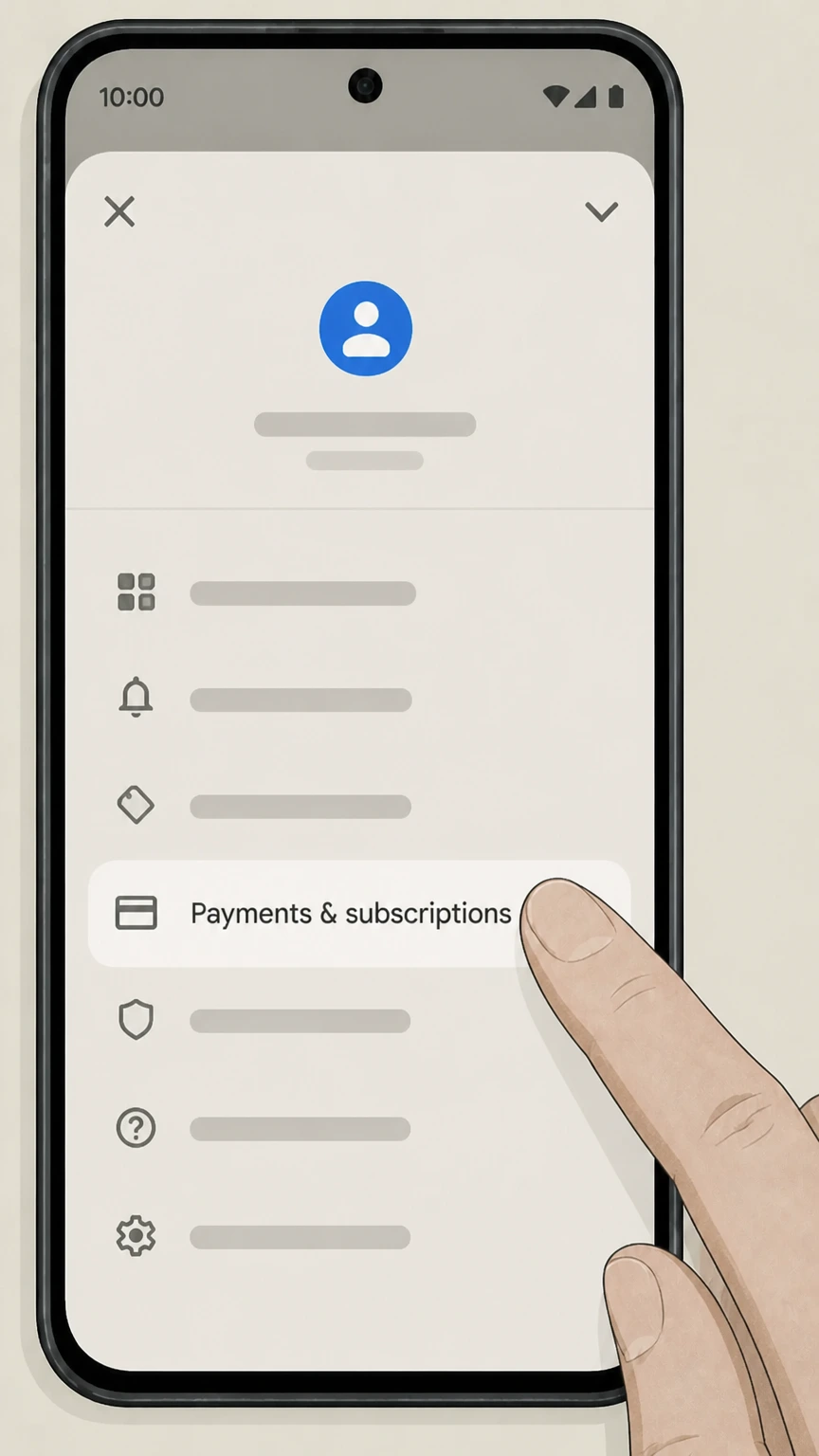 3
3Go to Payments & subscriptions
From the account menu, tap Payments & subscriptions to manage your payment methods and subscriptions. Use the Chicago Tribune account named on your receipt, and continue only after the next status in this cancellation path is visible.
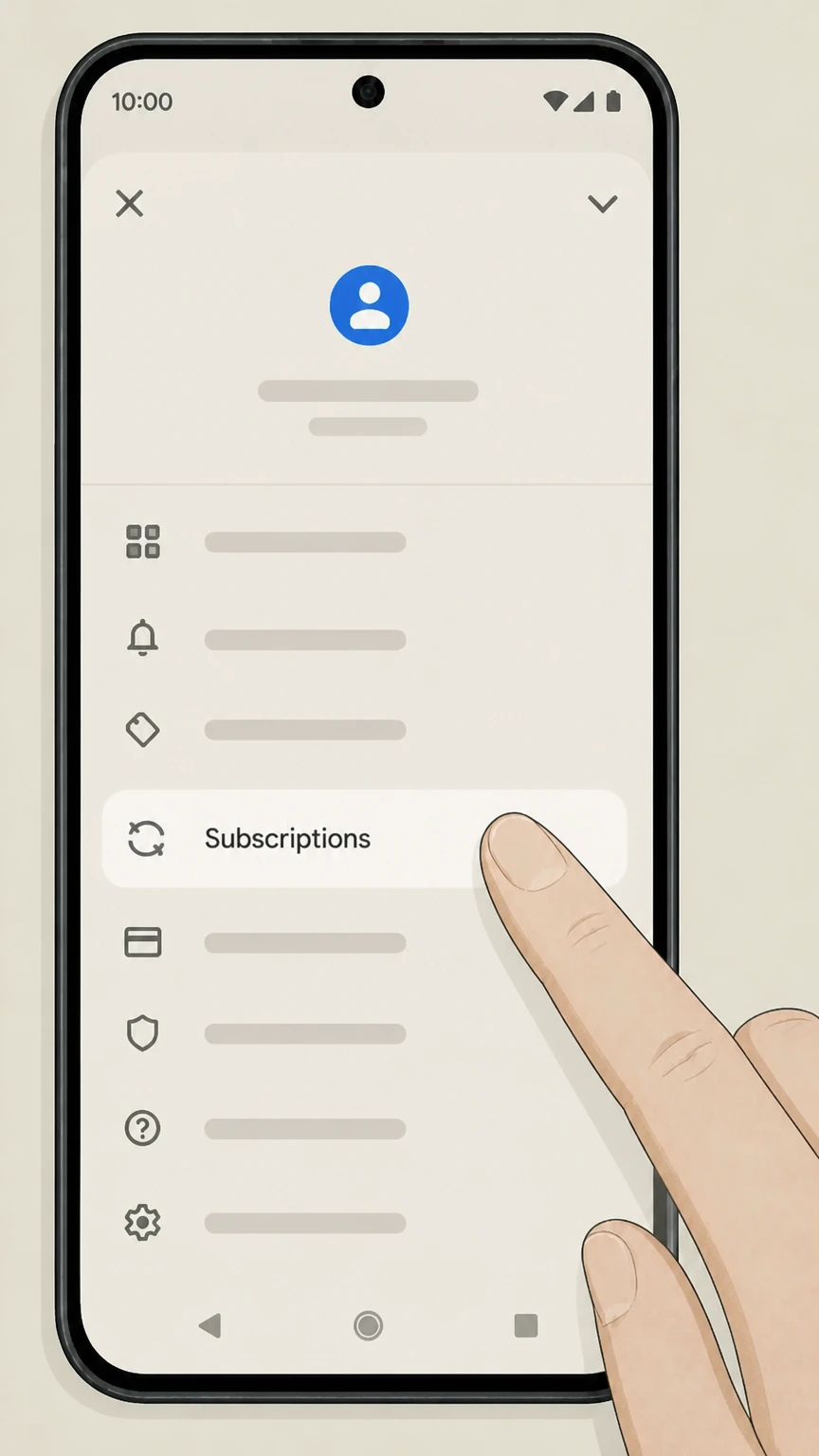 4
4Open Subscriptions
Tap Subscriptions to view the list of active Google Play subscriptions on this Google account. Use the Chicago Tribune account named on your receipt, and continue only after the next status in this cancellation path is visible.
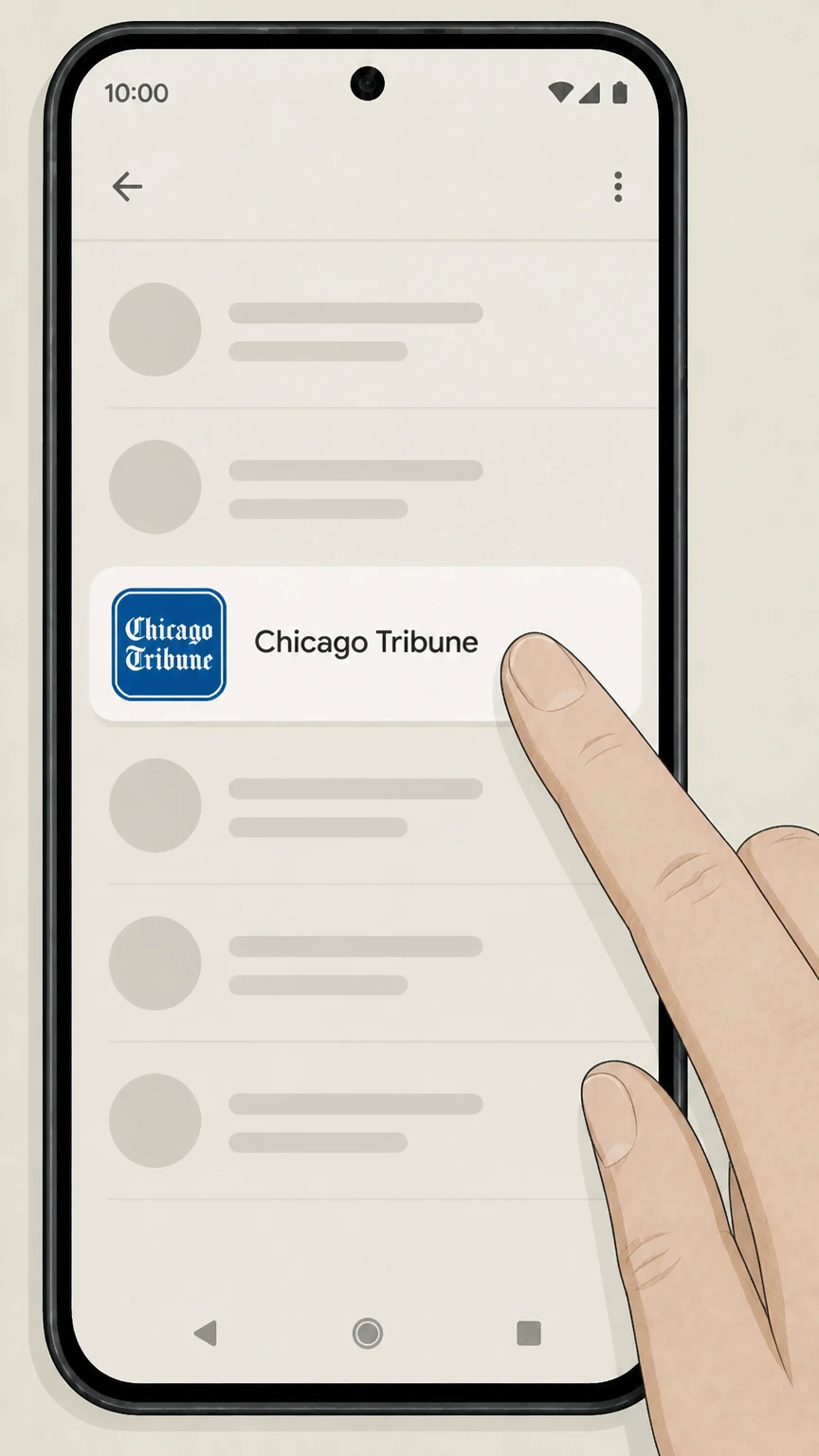 5
5Select Chicago Tribune
In the subscriptions list, tap Chicago Tribune to open the subscription details screen. Use the Chicago Tribune account named on your receipt, and continue only after the next status in this cancellation path is visible.
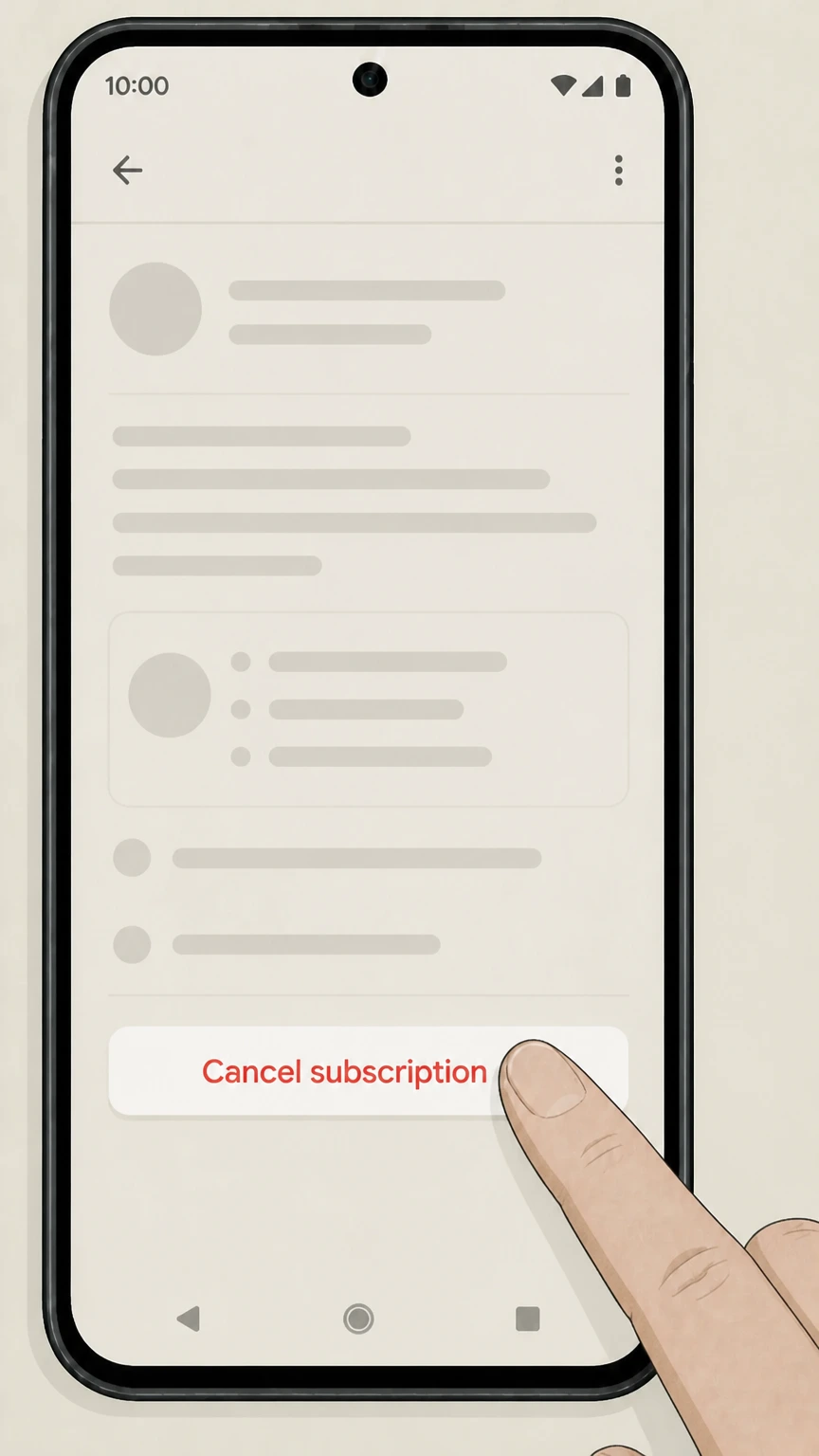 6
6Tap Cancel subscription
On the Chicago Tribune subscription screen, tap Cancel subscription and follow the prompts until Google Play confirms cancellation. Use the Chicago Tribune account named on your receipt, and continue only after the next status in this cancellation path is visible.
Refund policy
Refunds after canceling Chicago Tribune
Refunds depend on who bills you and the reason for the request. Tribune Publishing treats most Chicago Tribune subscriptions as fully prepaid and non‑refundable, while Apple and Google Play apply their own, separate refund policies for in‑app subscriptions.
Check my refund options- Tribune subscriptions are generally non‑refundable
- Subscriber Terms describe your Chicago Tribune subscription as a fully prepaid, non‑refundable license to access content for the subscription term; no unused portion of a term will be refunded, and there is no standard credit for vacation interruptions.
- Limited discretionary credits or refunds
- Tribune reserves the right to issue refunds or credits in limited situations, such as technical problems or delivery failures, but emphasizes that any refund or credit is at the company’s sole discretion and subject to applicable law.
- App Store refunds controlled by Apple
- For Chicago Tribune subscriptions billed by Apple, refund eligibility is determined under Apple’s own policies; Apple Support directs users to submit refund requests through the Report a Problem website, where Apple reviews and, if approved, issues the refund.
- Google Play and Subscribe with Google refunds
- For Android and Subscribe with Google purchases, Google states that most subscription payments are non‑refundable except in defined cases (such as faulty access), and that you must follow Google Play’s refund procedures rather than contacting the publisher for repayment.
- Cancellation versus refund
- Across Tribune, Apple, and Google, canceling a subscription primarily stops future renewals; you typically continue to receive access through the already‑paid period, and any refund for that period is the exception, not the rule.
For the latest wording on non‑refundability, discretionary credits, and any state‑specific rights, review Tribune Publishing’s Subscriber Terms alongside Apple or Google’s refund pages before you request money back. Review official refund policies
Auto-renew & Easy Pay
How Chicago Tribune subscriptions auto‑renew
Chicago Tribune subscriptions sold by Tribune Publishing are set up as continuous, automatically renewing services under shared Subscriber Terms.
Continuous subscription by default
Tribune Publishing’s Subscriber Terms state that all subscriptions, including Chicago Tribune, are continuous and will automatically renew until you cancel, with charges applied at the interval shown on your order page.
Right to cancel at any time
The same terms explain that you may cancel service at any time by calling or emailing the contact listed for Chicago Tribune, and in some jurisdictions by selecting Cancel Subscription in your online account settings.
Easy Pay automatic payments
When you subscribe, you are enrolled in Easy Pay, authorizing recurring charges to your stored payment method; you can revoke this authorization by calling customer service or updating your subscriber account, but stopping Easy Pay alone does not cancel the subscription.
Advance notice of price changes
Tribune Publishing commits to notifying subscribers at least ten days before a subscription price increase or other variation in the amount charged for the current subscription term.
Direct billing
Direct-billed cancellation with Tribune Publishing
Subscribers billed directly by Chicago Tribune must use Tribune Publishing’s contact channels and, where available, the customer portal to cancel.
Primary cancellation channels
Subscriber Terms specify that you must cancel a direct‑billed subscription by calling the appropriate number or emailing the appropriate address listed for Chicago Tribune in the Contact Us section.
Online account cancellation
Depending on your jurisdiction and how you signed up, the terms indicate that you may also be able to cancel online by selecting a Cancel Subscription option in your account settings after logging into the Chicago Tribune customer portal.
Postal mail not accepted
Tribune Publishing explicitly notes that it does not accept written correspondence sent by U.S. mail or similar methods as a valid way to cancel a subscription.
Effect on current charges
The terms clarify that you will be charged for any service delivered prior to cancellation, so you should cancel before your next billing cycle if you want to avoid additional charges.
Apple in-app
Apple App Store billing for Chicago Tribune
If you subscribe through the Chicago Tribune iOS app, Apple manages billing and cancellation through its subscriptions system.
Subscription sold via App Store
The Chicago Tribune app’s product page on the App Store offers Unlimited Digital Access as an auto‑renewing in‑app purchase, with terms explaining that your iTunes account will be charged and renewal occurs automatically unless you turn off auto‑renew in Account Settings.
Manage in Apple subscriptions
Apple Support instructs users to manage and cancel App Store subscriptions by opening Settings, tapping their name, and using the Subscriptions screen, not by contacting the app developer.
No mid-period cancellation refunds
The Chicago Tribune App Store description notes that no cancellation of the current subscription is allowed during the active period; turning off auto‑renew stops future billing, but you typically keep access through the paid term rather than receiving a partial refund.
Refunds handled by Apple
Apple’s refund policy explains that some App Store subscription charges may be refundable through the Report a Problem process, but such refunds are evaluated and issued by Apple, not by Chicago Tribune directly.
Google Play
Google Play billing and Android cancellation
Chicago Tribune’s Android app uses Google Play Billing for in‑app purchases, which must be canceled from your Google account rather than through the newspaper’s billing systems.
Digital purchases via Google Play
The Chicago Tribune listing on Google Play indicates that the app contains digital in‑app purchases, meaning that any subscriptions started there are billed by Google Play to the Google account used at signup.
Cancellation from Play subscriptions
Google Play Help specifies that to cancel an Android subscription you must go to Subscriptions in the Google Play app, select the subscription, and tap Cancel subscription; simply uninstalling the app does not stop billing.
Access after canceling
Google explains that when you cancel a subscription or stop its renewal, you typically retain access until the end of the current billing period, after which you are not charged again unless you resubscribe.
Refund policies set by Google
Subscribe with Google and Google Play refund policies clarify that refunds for subscription charges are limited and handled under Google’s own rules; canceling mainly prevents future renewals rather than generating a refund of past charges.
After you cancel
What changes after you cancel Chicago Tribune
Canceling affects recurring billing and future deliveries, but some access and account data may persist under Tribune Publishing’s policies and the platforms’ rules.
Billing stops after the paid term
Tribune’s Subscriber Terms describe subscriptions as fully prepaid, non‑refundable licenses for a defined term; canceling stops further renewals, but you remain responsible for charges already incurred and generally will not receive a refund for unused days.
Digital access usually continues until term end
For Apple and Google Play subscriptions, platform help articles indicate that your access continues until the end of the billing cycle you already paid for, even after you turn off auto‑renew, so plan your cancellation accordingly.
Print delivery ends once account reaches paid-through date
For home delivery, Tribune’s terms explain that your paid‑through date reflects special editions, surcharges, and any credits; once your subscription reaches that date after cancellation, delivery stops unless you renew.
Account and data are governed by privacy policy
Tribune’s Privacy Policy governs how your personal information is handled; canceling a subscription changes your entitlement to content and marketing programs but does not itself describe automatic deletion of all account data.
Print & delivery
Print subscribers: delivery, surcharges, and special editions
Chicago Tribune home delivery subscriptions have additional terms that can affect your final charges and remaining service when you cancel.
Delivery surcharge may shorten your term
Subscriber Terms provide that home delivery subscriptions may incur a per‑delivery “Delivery Surcharge” that is debited weekly and shortens the subscription term accordingly, which affects how long delivery continues after you cancel.
Special editions can reduce subscription length
The terms state that Special Editions, including a Thanksgiving edition where applicable, may be billed as separate charges that effectively shorten your paid‑through date unless you call Subscriber Services to opt out of them.
Credits for missed deliveries
Tribune explains that if a paper is not delivered by a stated time, you can call customer service to receive a credit, which extends your paid‑through date; after multiple missed deliveries, a refund may be offered unless you prefer a credit.
No automatic credit for vacation holds
The Subscription Refund Policy notes that no credit is offered for vacation interruptions by default, so placing a hold on delivery typically does not generate a refund; you must discuss options with Subscriber Services if you need adjustments.
Disputes & issues
Handling billing disputes and subscription problems
Tribune Publishing sets specific timelines and contact paths for billing disputes, complemented by Apple and Google procedures for their own charges.
120-day deadline for billing disputes
Tribune’s Subscriber Terms require that any billing disputes on your newspaper account be raised by phone or electronic communication within 120 days of the statement date to be eligible for review.
Fixing payment issues on platform subscriptions
Google Play Help directs you to update or change your payment method in the Play Store if a subscription payment fails, noting that subscriptions may be canceled if payments cannot be processed.
Checking Apple purchase history
Apple Support advises reviewing your App Store purchase history to confirm which Apple Account was charged and to identify recurring Chicago Tribune subscription entries before requesting changes or refunds.
Escalating unresolved issues
If you cannot resolve a dispute directly, you may reference Tribune’s binding arbitration and class‑action waiver provisions in the Subscriber Terms, or follow Apple’s and Google’s own escalation paths for platform‑billed charges.
Email & SMS
Newsletters, alerts, and marketing after cancellation
Canceling your paid subscription does not automatically manage all newsletters and marketing programs; Tribune’s privacy documents describe separate controls.
Newsletter opt-out is separate
Tribune’s Privacy Policy explains that you may cancel newsletter participation at any time by following unsubscribe instructions in emails or by calling the official customer service number, which is separate from canceling a paid subscription.
SMS and promotional programs
The policy describes promotional and limited-time programs that may use your contact information; you can stop participation following instructions provided when you enrolled or by contacting customer service using the numbers on the Contact Us page.
Effect of canceling on marketing data
While canceling a subscription changes your entitlement to paid content, the Privacy Policy indicates that data collection and retention for past activity remain governed by that policy unless you exercise specific privacy rights where available.
Managing cookies and free-access offers
Tribune notes that some free access to content is tied to cookies and promotional programs; opting out of cookies or ceasing to use the services can end participation in those programs without directly affecting your subscription status.
What official sources do not confirm
Limits of the public Chicago Tribune cancellation guidance
These points are intentionally qualified because the official sources reviewed on August 16, 2026 do not publish a complete answer.
Documented limitation 1
Customer-facing pages on chicagotribune.com, including the detailed customer portal, were blocked to our crawler, so exact button labels and on-screen steps for online self-service cancellation could not be verified beyond Tribune Publishing’s generic reference to a Cancel Subscription option in account settings.
Documented limitation 2
We could not safely confirm any current Chicago Tribune pricing tables, promotional offers, or senior-specific discounts from the allowed official sources; all guidance about costs therefore avoids quoting or implying exact amounts.
Documented limitation 3
Public Tribune Publishing documents do not describe in detail how canceling a subscription affects long-term account status, historical article access, or data deletion, so statements about account persistence rely on the absence of any automatic-deletion language rather than explicit guarantees.
Documented limitation 4
There is no Tribune-specific documentation in the allowed sources about third-party bundle subscriptions (such as access via aggregators or membership bundles), so this guide does not cover cancellation flows for bundled or corporate-access arrangements.
Documented limitation 5
Platform policies and Tribune terms can change frequently; users should re-check the linked Subscriber Terms, Apple Support, and Google Play Help pages for the most current wording before acting on this guidance.
Chicago Tribune cancellation FAQ
Questions people search about canceling Chicago Tribune, answered with official provider or billing-platform sources checked on August 16, 2026.
How do I cancel my Chicago Tribune newspaper subscription if I pay the newspaper directly?
How do I cancel my Chicago Tribune subscription on my iPhone?
How do I cancel my Chicago Tribune subscription on Android or Google Play?
What happens to my access after I cancel Chicago Tribune?
Can I get a refund after canceling my Chicago Tribune subscription?
How far in advance should I cancel to avoid the next renewal?
How do I pause or vacation-hold my Chicago Tribune delivery instead of canceling?
How much is a Chicago Tribune subscription for seniors?
Does canceling my Chicago Tribune subscription delete my online account?
How do I resolve a billing problem with my Chicago Tribune subscription?
Untangle this Chicago Tribune issue.
Let Pine handle the provider follow-up and keep the confirmation in one place.
